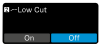
Setting the transmitter low cut
The low cut filter can reduce unwanted low-frequency noise in audio recordings.
To activate/deactivate the low-cut filter:
-
Then tap "On" or "Off" to enable/disable this feature for the particular transmitter.
The low cut filter is now enabled/disabled.