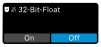
32-bit float recording function
The 32-bit float recording function enables exceptionally high dynamics, precision and the recovery of quiet and overdriven recordings on the internal memory.
Notice:
To enable/disable the 32-bit float feature:Please note that this recording method reduces the available recording time, as 32-bit float recordings require more space than the regular 24-bit/48kHz recordings.
-
Then tap "On" or "Off" to enable/disable this feature.
The 32-bit float function is now enabled/disabled.