Jump to main content
Spectera
Spectera
3rd Party API AVX Control Cockpit DeviceHub Digital 6000 Evolution Wireless Digital Profile Wireless Spectera SpeechLine Digital Wireless TeamConnect Bar TeamConnect Ceiling Medium TeamConnect Ceiling M Plus TeamConnect Ceiling 2 ...alle anzeigen
  • Quick start
  • Product information
  • Instruction manual
  • Knowledge base
  • Specifications
  • Contact
  1. Home
  2. Instruction manual

    Detailed description of the start-up and operation of the hardware and the WebUI.

  3. SKM
  4. Product overview
  • Instruction manual

    Detailed description of the start-up and operation of the hardware and the WebUI.

    • Base Station
    • WebUI

      Detailed description of the WebUI navigation and configuration.

    • SEK
    • SKM
      • Product overview
      • Inserting and removing the rechargeable battery

        The handheld transmitter is powered exclusively by the BA 70 battery (separate accessory).

      • Replace microphone module

        Different microphone modules are available for the handheld transmitter.

      • Attaching the SKM COM

        The SKM COM with the push button adds additional functions to the SKM.

      • Meaning of the LED

        The LED on the bottom of the SKM can display the following information.

      • Switching the SKM on and off
      • Information on the display

        You can view the following information on the SKMs display.

      • Pairing the SKM to the Base Station
      • Using the SKM COM

      • Updating the SKM

        You can update the firmware of the SKM via Spectera WebUI.

    • DAD
    • CHG 70N-C charger

      The CHG 70N-C is a network enabled charger featuring two individual charging bays.

    • L 70 USB charger
    • Modular L 6000 charger

      These sections contain information about installing, starting up and operating the modular L 6000 charger and the corresponding charging modules.

    • Cleaning and maintenance

      Note the following information when cleaning and maintaining products of the Spectera series.

Product overview


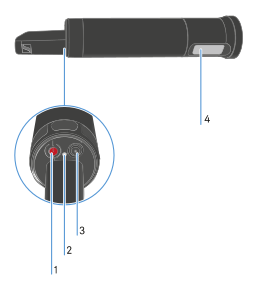
1 ON/OFF Button
see Switching the SKM on and off
2 LED
see Meaning of the LED
3 Control button
see Information on the display
4 Display
see Information on the display
v1.4.2 | 09/2026
English Deutsch Français Español Português 简体中
© Sennheiser electronic SE & Co. KG | |
Wählen Sie hier Ihre Sprache aus