
Information on the display
You can view the following information on the SKMs display.

The order of the displayed information changes depending on the setting.
-
Press the Control button to navigate through the menu.
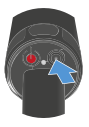
To check the battery status:
No audio link is configured.
-
Press the Control button.
The battery status is displayed for five seconds.
To display the E-Label:
The SKM is paired with the Base Station
and the enabled license uses E-Labels.