
Meaning of the LED
The LED on the bottom of the SKM can display the following information.
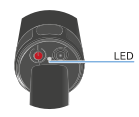
The LED indicates the status between the SKM and the Base Station.

|
The LED is off:
|

|
The LED is orange:
|

|
The LED is flashing blue:
|

|
The LED is flashing blue quickly:
|

|
The LED is blue:
|

|
The LED is flashing green:
|

|
The LED is flashing green quickly:
|

|
The LED is green:
|

|
The LED is pulsing green:
|

|
The LED is flashing white:
|

|
The LED is flashing red:
|

|
The LED is flashing green and red:
|