
FAQ
The most frequent questions and answers summarized in a chapter.
What is the difference between TC Bar S and TC Bar M?
- TC Bar S: Small meeting rooms (3 m x 4.5 m (10 ft x 15 ft)) for up to 7 people
- TC Bar M: Small to medium meeting rooms (4.5 m x 6 m (15 ft x 20 ft)) for up to 12 people
How does the initial configuration of the TC Bar work?
- As a stand-alone solution, the TC Bar is directly connected with a device and operated using only a USB-C® connection. Only restricted functions are available in this operating mode (see Operation as a stand-alone solution).
- You can use the embedded local WebUI (firmware version ≥ 2.0.0) to quickly and easily configure and control your device.
- As a unit in the network, the TC Bar can be initially assigned to a control instance and managed via the respective application for seamless integration into your corporate network (see Control software and Operation as a networked conference system).
Is it possible to save the camera position?
Yes, the camera position can be saved and called up again:
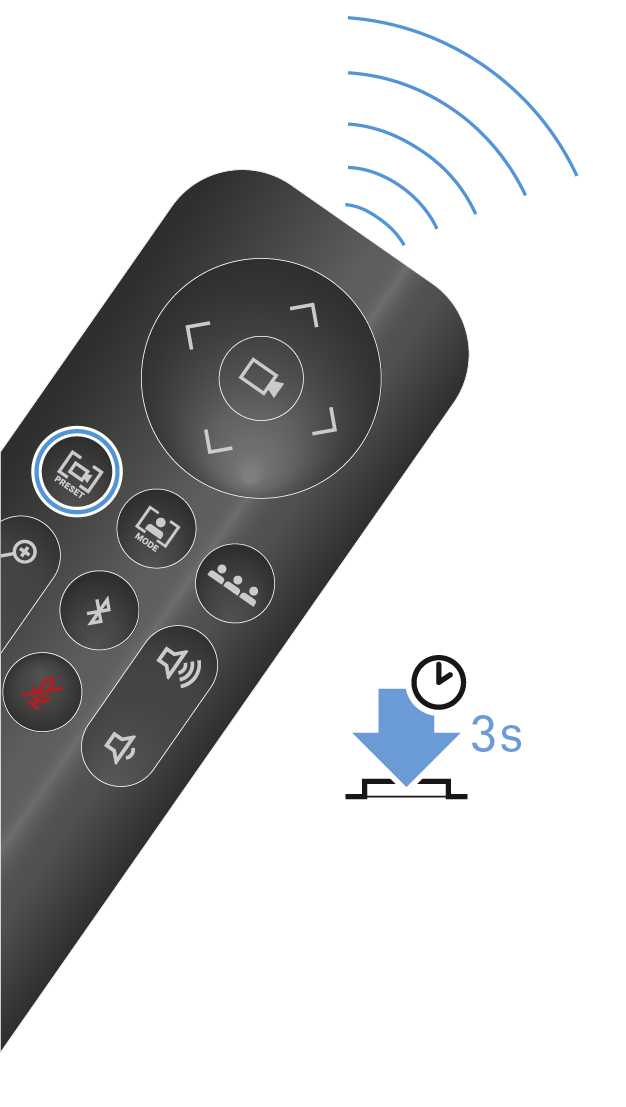
Briefly press the Preset button to move the camera to the saved position.
You can find more information in the chapter Setting the camera position.
How does the beamforming technology work?
Both person tiling and auto framing work using advanced video AI algorithms.
With person tiling, each member of a meeting is placed in the center and in the foreground and receives their own tile in the meeting. As soon as the camera detects a participant, they receive their own tile. As a result, even people in the back row are placed in the foreground and appear very close to the participants who are connected.
Auto framing ensures that all participants remain in the field of view, even if they move around in the room – whether they shift their chairs slightly or get up to move around the room.
You can find more information in the chapter Camera settings.
What connectivity does the TC Bar have?
- USB-C® (main connection for the conference system)
- USB-A (connection for an external PTZ camera)
- RJ45 (Ethernet/control/Dante®)
- HDMI® (connection for screen output)
- DC IN (connection for the power supply)
- Bluetooth®
You can find more information in the chapter Connectivity.
Is there an analog audio output?
No.
Is it possible to change the LED brightness?
Yes, the setting can be configured in the Sennheiser control software.
What mounting options are there for this product?
- Mounting on the wall (bracket included in the scope of delivery)
- Mounting on the table (bracket included in the scope of delivery)
- Mounting on a VESA mount (optional accessories required, see Accessories)
- Mounting on a tripod (bracket included in the scope of delivery, but not the tripod)
You can find more information in the chapter Mounting options.
Which audio options are available for Bluetooth®, USB, and HDMI®?
Essentially, bidirectional audio is available (special audio profile for playing music).
- Bluetooth®:
- With Bluetooth®, mobile devices (e.g., smartphones) use two different codecs: the HFP and the A2DP codec. The HFP codec is optimized for voice and conference sound and the A2DP codec for music applications.
- USB:
- In USB applications, a specific EQ of the TC Bar distinguishes between conference and music playback..
- HDMI®:
- HDMI® does not support any audio, since the TC Bar itself is used as an audio device. The connection serves only to transmit the video signal to an external screen.
What network options are available for the TC Bar?
- TC Bar S: Single domain mode
- TC Bar M: Split mode
- The TC Bar S has only one network connection and can provide only a combined signal for Dante® and control. That is why a switch is required in this configuration to connect all devices on which the control software is running via a control network and to connect additional Sennheiser microphones via a Dante® network.
- The TC Bar M has two network connections. One connection can be used to control the bar through the network using the Dante controller and through control software directly using a switch. The other port is used to connect an additional Sennheiser microphone via the Dante® network (e.g., TCC M). Only an Ethernet cable is required for this purpose. The TCC M can then be controlled using the same network via the control software or the Dante controller.
Additional configuration options are explained in the chapter Network configuration.
Is it possible to separate the Dante® and Control networks? ?
Yes. Since both TC Bars are different, the following must be observed:
- TC Bar M:
- Since the TC Bar M has two network connections, you can separate the networks physically by activating the network mode Split mode. This mode is the same for MCR and TCC M.
- TC Bar S:
- Since the TC Bar S has only one network connection, the Dante® network and control network must be separated virtually via VLAN tagging. This can be done by selecting the mode “Dual domain mode” in the control software.
Additional configuration options are explained in the chapters Network configuration and Activating tagged VLAN (Dante® network).
Are some functions deactivated in the factory settings for security reasons?
Yes, Bluetooth® and Wi-Fi (not yet available) have to be activated in the control software (see Activating Bluetooth®).
Can I connect an additional camera?
Yes, it is possible to connect an external PTZ camera from a third-party provider directly to the TC Bar using the USB-A connection. In this case, the user can select either the TC Bar’s internal camera or the external PTZ camera for an additional whiteboard or presenter view. There is no smart camera switching.
Which USB cameras can I connect?
Since there is a USB hub in the TC Bar, the connection functions like a direct connection to the laptop/PC. Therefore, any PTZ camera can be connected. The configuration and selection must take place from the device.
Can I use my own DSP instead of a third-party DSP for ceiling microphones?
Yes, if a ceiling microphone is connected to a TC Bar, no additional DSP is required. The TC Bar has an integrated auto mixing and multi-AEC function (acoustic echo compensation).
Does the TC Bar have an automatic echo suppression function (AEC)?
Yes. Thanks to external microphone connections, the TC Bar has a multi-echo-suppression function.
Is there a remote control? And if so, are the functions contained in media control systems like Creston, Extron, etc.?
Yes, an IR (infrared) remote control is available and included in the scope of delivery. Not all commands for the remote control are available for media control systems yet. However, they will be provided in a future update.
Does the TC Bar support the beamforming feature?
Yes. The bars have a linear microphone array with 23 static beams. Depending on the direction from which a speaker is detected, the beam that can record the speaker best is selected. If an additional speaker is detected from another direction, the algorithm automatically switches the beams.
How does the TC Bar work if it is only connected via USB and power supply?
If the TC Bar is supplied with power and connected to a laptop via a USB, it can be used directly as an audio and video conference device in BYOD (bring your own device) mode. In the default mode, some functions such as Bluetooth® and Wi-Fi are deactivated. They can be activated in the Sennheiser control software.
Does the TC Bar save personal data?
This product has an integrated memory and can store sensitive personal data that was added in the context of the Control Cockpit software or other third-party applications.
How can I delete my personal data?
You can permanently delete your personal data by resetting the device to the factory settings (see the chapter Resetting the TC Bar to factory settings).
What is the DisplayLink® technology?
With DisplayLink®, you can quickly and easily connect several monitors to your PC using a simple USB connection. The DisplayLink® technology is integrated in the TC Bar and does not require an additional HDMI® cable from your PC to your TV screen.
Do I need a DisplayLink® driver on my video conference device?
Yes. It is installed by default on Windows® PCs. Check whether the minimum required version of the DisplayLink® driver is installed on all users PCs involved in order to be able to use the plug & play function for joint usage of the screen.
It is possible that no DisplayLink® driver is installed by default on Mac devices, since Apple is a closed system. In this case, the minimum required DisplayLink® driver version must be installed as indicated below.
Which DisplayLink® driver version do I need?
- Windows®: 10 or newer
- macOS: 13 or newer
- Android: 11.0 or newer
- Installed DisplayLink® driver on the operating system used
You can find information about the latest driver for the operating system you use at: DisplayLink®.
What does the repair process look like? Are there service parts?
The TC Bar is designed as a repairable product in order to fulfill the requirements of a sustainable service concept. We have several replacement parts and special service tools that can be used to replace parts and return the device to a flawless condition.
The TC Bars are maintained in our service centers, which are located around the world. It may be necessary to send the product to one of these service centers for maintenance.