
Devices
Manage Sennheiser devices using an overview page that displays all enrolled devices, along with a detail page for configuring individual device settings.
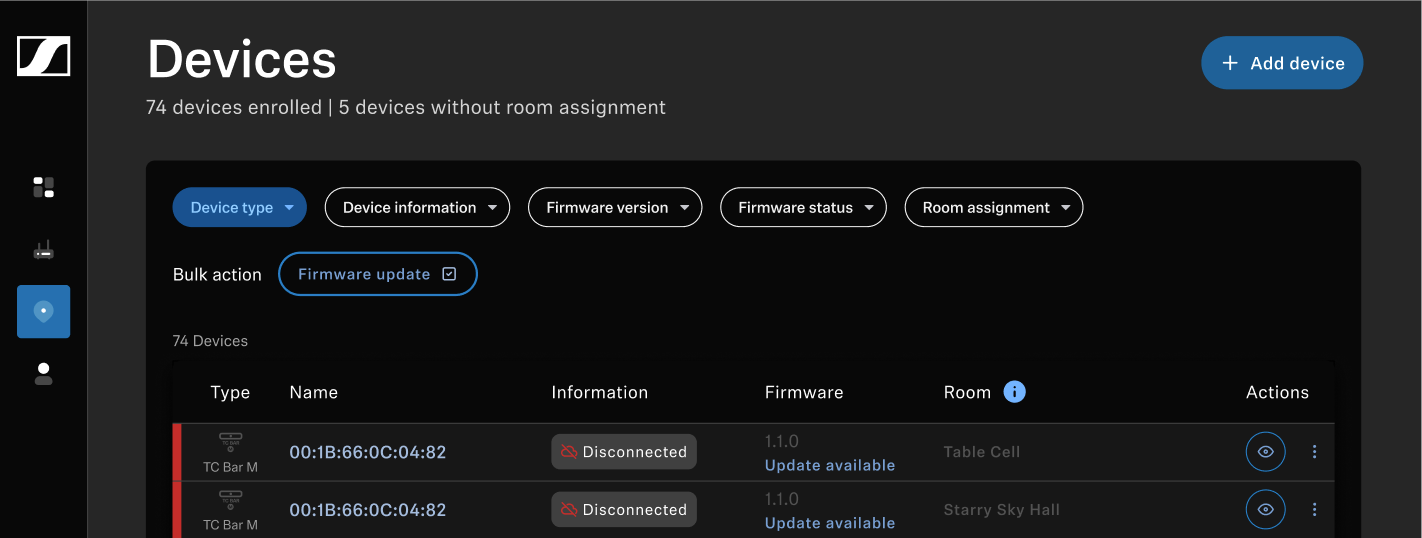
- Device overview page — shows all enrolled devices in a consolidated list and provides a quick summary for each device.
- Device detail page — focuses on a single device and displays its detailed settings and information.
- Room page — displays the devices assigned to a specific room.
Device overview page
- Device name
- Device type
- Device information
- shows the connection state of the device and potential errors and warnings
- Firmware version
- Room assigned to the device
- Identify device
To narrow the display to the devices you need, use one or more filters. You can filter by the following criteria:
Device detail page
- mute
- reboot
- identify
Below this, a core information section displays all the essential details of the respective device immediately. This includes the following information, which may vary depending on the device:
- Room assigned to the device
- Serial number
- Firmware version
Room page
The Room Page provides a filtered list of all devices assigned to the selected room. To help clearly identify each device’s location, the full location path is displayed. Devices in the list are sorted alphabetically by device name. In the device list the following properties of the devices are represented:
- Device name
- Device type
- Device information (shows the connection state of the device and shows potential errors and warnings)
- Firmware version
- Identify device