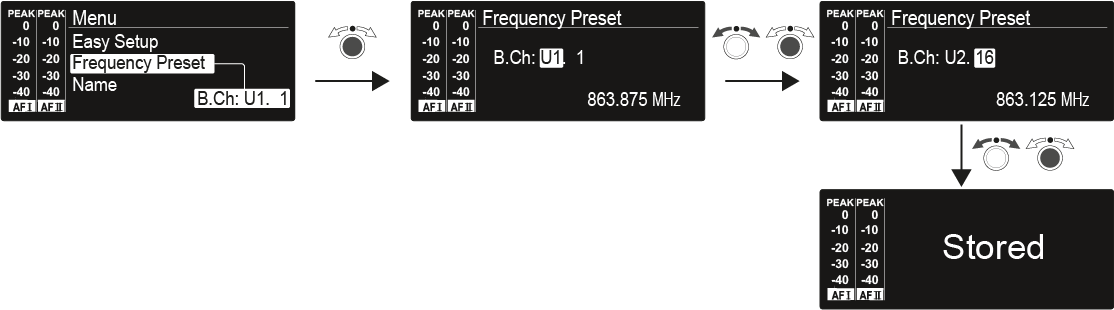
Starting up and operating devices of the 2000 IEM series.
In the SR 2000 IEM / SR 2050 IEM menu, you can configure the following settings.
Manually selecting a frequency bank and channel
You can monitor and control one or more SR 2000 IEM / SR 2050 IEM transmitters via a network connection using Sennheiser Wireless Systems Manager (WSM) software.
You can connect Mono or Stereo signals via the two input sockets BAL AF IN L(I) and BAL AF IN R(II).
You can view the following information on the transmitter display.
Navigating through the menu
Adjusting the input sensitivity – AF audio level
Configuring the audio transmission
Activating Easy Setup Sync
Entering names
Switching the automatic lock-off function on and off
In the Advanced submenu you can configure enhanced settings
Configuring transmission frequencies and frequency banks U1 to U6.
Configuring, activating or deactivating parameters for transmission to the receivers.
Configuring the transmission power
Activating/deactivating warnings
Adjusting the contrast of the display panel
Resetting the transmitter
Adjusting the network configuration
Show software revision
You can synchronize the 2000 IEM series transmitters and receivers via the transmitter’s and receiver’s infrared interfaces.