
Displays on the transmitter display panel
You can view the following information on the transmitter display.
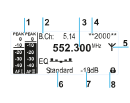
- 1 AF audio level (audio frequency)
- Audio channel level with peak hold function
- 2 Frequency bank and channel
- Current frequency bank and channel number
- 3 Frequency
- Configured transmission frequency
- 4 Name
- Freely selectable name of the receiver
- 5 Transmission icon and transmission power
- RF signal is atng transmitted
- 6 RF Power
- Configiured RF Power
- 7 Input sensitivity
- Configured input sensitivity for the NF signal on the audio input socketsBAL AF IN L (I) and BAL AF IN R (II))
- 8 Lock-off function
- Lock-off function is activated.