Possible settings
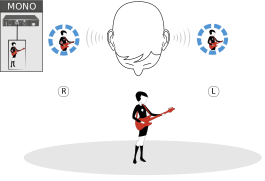
MONO
Only the transmitter’s left audio input is transmitted. The receiver receives the signal as a mixed mono signal in both the left and right channels and reproduces it the same for both ears.
Example:
There is a solo artist on the stage. The artist sets the audio transmission mode to “Mono” and uses the left audio input on the transmitter. The mono signal is delivered to both ears at the receiver.
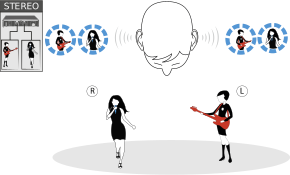
STEREO
The transmitter’s left and right audio inputs are transmitted. Depending on the signal type (direct mono signal from artists or mixed stereo signals from the mixing console), the two audio channels are added and delivered to the listener as mixed mono signals (direct signals from artists) or mixed stereo signals (mixed signals from the mixing console).
You can use the Focus (Setting the FOCUS) and Panorama (see Panorama setting) functions to control the volume distribution on individual channels.
Example:
- Artist A uses the left audio input
- Artist B uses the right audio input
At the receiver, the mixed audio signals from both artists arrive at both ears and can then be individually controlled using the Focus and Panorama functions.