
Setting the command mode
You can set the command mode for the COM button.
The settings of the selected audio output channels can vary whether the command mode is active or inactive.
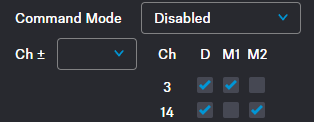
- Command mode disabled:
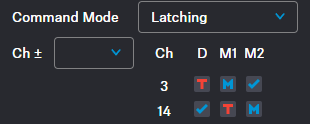
- Command mode enabled:
This option is only available if Mic is selected as the audio input.
The following options are available separately for each selected audio output channel on the Base Station individually:
 Disabled - audio is either on or off
 Momentary - hold down the COM button
- Latching - press the COM button to change the state
To set a command mode:
If you selected Momentary:
-
Set the options for the audio channel by clicking in the boxes.

Meaning of the letters and colors:T = talk
M = mute
red = audio inactive
blue = audio active
-
Hold down the COM button.
The icon changes to
 .
The audio transmission changes:
.
The audio transmission changes: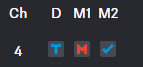
If you selected Latching:
-
Set the options for the audio channel by clicking in the boxes.
Meaning of the letters and colors:T = talk
M = mute
red = audio inactive
blue = audio active
-
Press the COM button.
The icon changes to
 .
The audio transmission changes:
.
The audio transmission changes: