Jump to main content
Spectera
Spectera
3rd Party API AVX Control Cockpit DeviceHub Digital 6000 Evolution Wireless Digital Profile Wireless Spectera SpeechLine Digital Wireless TeamConnect Bar TeamConnect Ceiling Medium TeamConnect Ceiling M Plus TeamConnect Ceiling 2 ...alle anzeigen
  • Quick start
  • Product information
  • Instruction manual
  • Knowledge base
  • Specifications
  • Contact
  1. Home
  2. Instruction manual

    Detailed description of the start-up and operation of the hardware and the WebUI.

  3. WebUI

    Detailed description of the WebUI navigation and configuration.

  4. Configuration

    Under Configuration, you can set the essential settings for the RF channel, antenna, Base Station and mobile devices.

  5. General settings

    Overview of the general settings and messages.
  • Instruction manual

    Detailed description of the start-up and operation of the hardware and the WebUI.

    • Base Station
    • WebUI

      Detailed description of the WebUI navigation and configuration.

      • Getting started

        Start your basic configuration with the recommended steps.

      • Configuration

        Under Configuration, you can set the essential settings for the RF channel, antenna, Base Station and mobile devices.

        • General settings

          Overview of the general settings and messages.

          • Enabling dark theme

            You can enable a dark theme for the WebUI surface.

          • Enabling solo control

            You can enable solo control to restrict configuration changes to a single user.

          • Enabling/disabling data collection

            Spectera collects operational data to enhance stability and functionality.

          • General messages

            Overview of the general messages.

        • RF configuration

          Here you can set up your RF channel and check the status of local permissions, your connected antenna, and any potential frequency interference in the surrounding area.

        • Base Station

          Here, you can check the basic settings of the Base Station and easily perform tasks such as firmware updates, walk tests, or restoring it to factory settings.

        • Audio interfaces

          Here you can monitor all available interfaces and manage the outputs.

        • Mobile Device Monitoring

          Here you can monitor the live data of the mobile devices as graphs.

        • Mobile Devices

          Here you can configure specific settings for mobile devices.

      • Frequency Scan

        You can use an RF scan to examine the current frequency situation of your connected antenna.

      • Audio Metering

        Under Audio Metering you can monitor all interfaces at a glance.

      • Audio inputs and outputs

        Here you have an overview of all channels at a glance and can assign the audio network input and output for the link channels directly and easily.

      • Changing the device password

        You have two options to change the device password on your Base Station.

    • SEK
    • SKM
    • DAD
    • CHG 70N-C charger

      The CHG 70N-C is a network enabled charger featuring two individual charging bays.

    • L 70 USB charger
    • Modular L 6000 charger

      These sections contain information about installing, starting up and operating the modular L 6000 charger and the corresponding charging modules.

    • Cleaning and maintenance

      Note the following information when cleaning and maintaining products of the Spectera series.

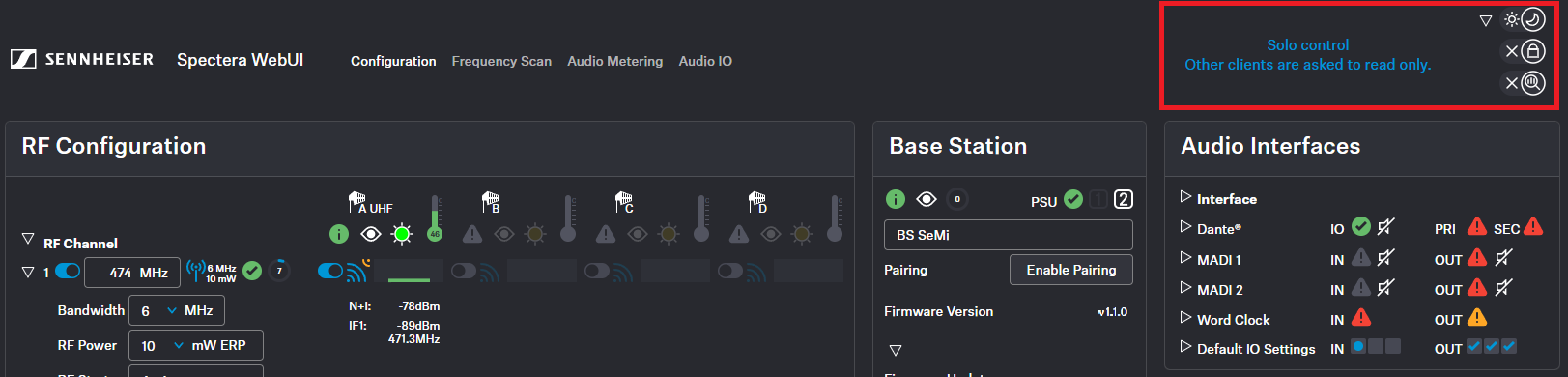
General settings

Overview of the general settings and messages.

You can find the following settings in the top right corner:
  • Dark / light mode (see Enabling dark theme)
  • Solo control (see Enabling solo control)
  • Data collection (see Enabling/disabling data collection)

Messages can be found here as well (see General messages).

Related information
  • Enabling dark theme
    You can enable a dark theme for the WebUI surface.
  • Enabling solo control
    You can enable solo control to restrict configuration changes to a single user.
  • Enabling/disabling data collection
    Spectera collects operational data to enhance stability and functionality.
  • General messages
    Overview of the general messages.
v1.4.2 | 09/2026
English Deutsch Français Español Português 简体中
© Sennheiser electronic SE & Co. KG | |
Wählen Sie hier Ihre Sprache aus