
Displays on the receiver’s display panel
Home Screen
The home screen appears automatically after switch-on or when no button has been pressed on the receiver for a long period of time.
If there is no radio link between the receiver and a transmitter, No Link appears on the display panel and the display brightness is automatically dimmed.
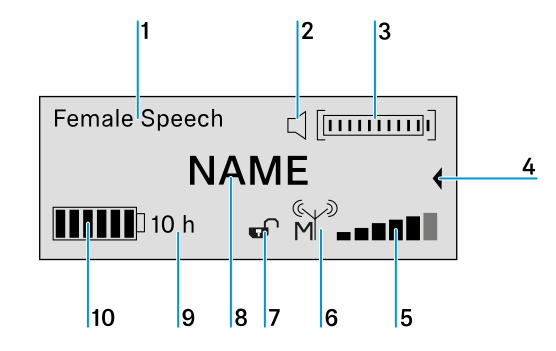
- 1 Selected sound profile
- Displays the name of the selected sound profile. If no sound profile is selected, nothing is displayed here.
- 2 MUTE status display

The received transmitter is not muted, but can be muted at any time. 
The received transmitter is muted. In addition, the status LED lights up yellow. 
The received transmitter cannot be muted because its MUTE switch is deactivated. see The System Settings menu. - 3 Audio level display
- The audio level is automatically adjusted.
- 4 Secondary home screen
- The secondary home screen appears when you turn the jog dial to the left.
- 5 6-step display for the RF signal level
- Displays the current level of the RF signal
- 6 RF output power of the transmitter, indicating master or follower
- Displays the RF output power of the received transmitter.
- Indicates whether the device is a master or a follower:

The device is the master. 
The device is a follower. 
The device is a follower, but is not synchronized. 
The synchronization status is unknown. - 7 Lock mode
-

The lock mode function is activated. The lock mode is currently deactivated and the receiver can be operated. 
The lock mode function is activated. The lock mode is currently activated. Long-press the jog dial to temporarily deactivate the lock mode. - 8 Name of the radio link
- The name of the radio link can be configured freely. See The Device Identification menu.
- 9 Expected remaining battery life of the received transmitter
- Displays the remaining battery life of the received transmitter in hours (only when the original Sennheiser BA 10, BA 30 and BA 40 accupacks are used).
- 10 7-step display of the accupack or battery capacity
- Graphically displays the current charge status of the accupack or the batteries.
Secondary Home Screen
When you turn the jog dial to the left from the home screen, the secondary home screen appears.
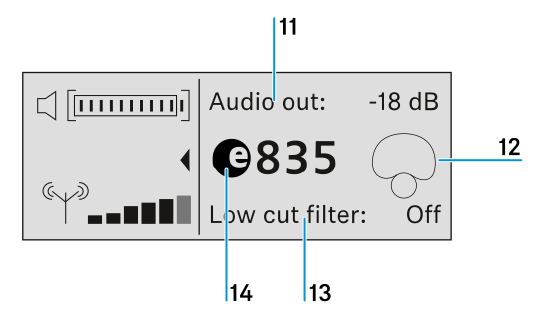
11 Audio output level of the receiver
12 Pick-up pattern of the microphone used
13 Status of the low-cut filter (ON/OFF)
14 Product name of the microphone capsule used