
Home Screen
After you switch on the receiver, the display panel initially displays the Sennheiser logo. After a short time, the home screen is then displayed.
The home screen has three different standard displays.
On the home screen, press the ESC button to switch between the standard displays. In Stereo mode, you can also press the UP/DOWN button to switch between the standard displays.
Frequency/Name standard display
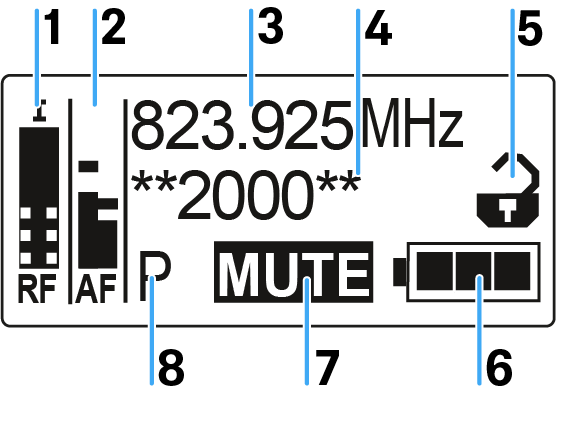
- 1 RF level (radio frequency)
- RF signal level display
- 2 AF audio level (audio frequency)
- Displays the audio level of the received transmitter (separated by channel in Stereo mode). When the display shows full deflection, the audio input level is excessively high.
- 3 Frequency
- Current receiving frequency
- 4 Name
- Freely selectable name of the receiver
- 5 Lock-off function
- Lock-off function is activated
- 6 Battery status
- see Rechargeable battery and charger
- 7 MUTE muting function
- The transmitter’s RF signal is deactivated, see Deactivating the RF signal (RF mute)
- 8 P pilot ton
- P = Activated pilot tone evaluation
Bank/Frequency/Limiter standard display
The Bank/Frequency/Limiter standard display also shows the audio channel (Stereo/Focus) and the limiter.
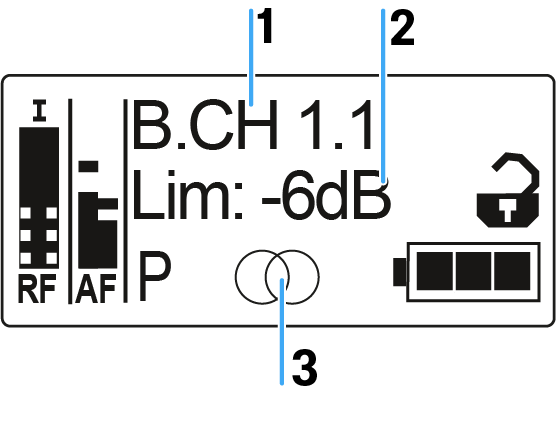
- 1 Frequency bank and channel:
- see Frequency Preset menu item
- 2 Limiter
- see Advanced -> Pilot Tone menu item
- 3 Audio channel, stereo
- Focus:

Frequency/High Boost standard display
The Frequenz/High Boost standard display also shows the audio channel (Stereo/Focus) and the treble boost.
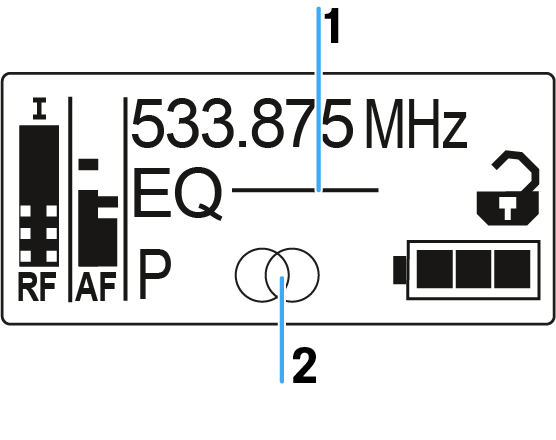
- 1 Treble boost EQ
- see High Boost menu item
- 2 Audio channel, stereo
- Focus: