
Product overview
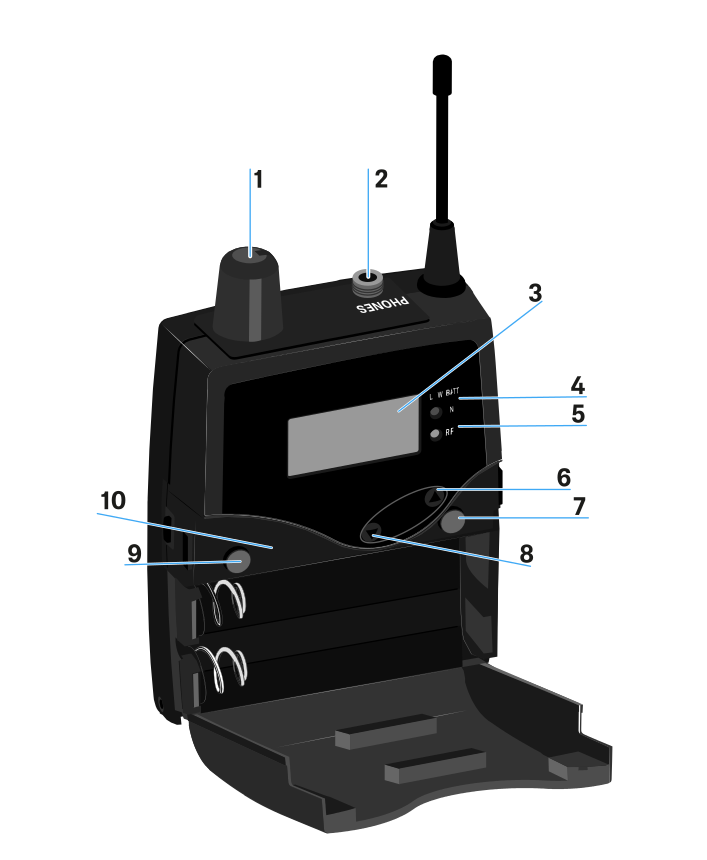
- 1 Volume control with on/off switch
- see Connecting earphones to the EK 2000 IEM
- 2 3.5 mm PHONES jack socket, lockable
- jack for connecting an earphone
- 3 Display panel
- see Displays on the EK 2000 IEM display panel
- 4 Operation and battery indicator, red LED
- illuminated = ON, see Switching the receiver on and off
- 5 Wireless reception indicator, green LED
- illuminated = RF, see Squelch menu item
- 6 UP button
- see Buttons for navigating through the menu
- 7 SET button
- see Buttons for navigating through the menu
- 8 DOWN button
- see Buttons for navigating through the menu
- 9 ESC button
- see Buttons for navigating through the menu
- 10 Infra-red interface
- see Synchronizing devices