
Using spare frequencies from the “life belt” option
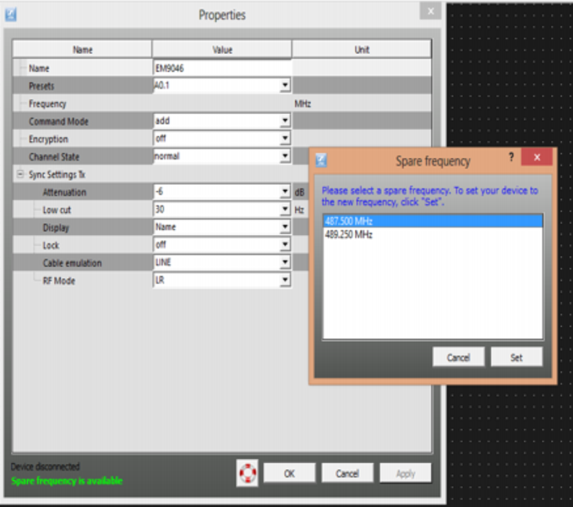
The “life belt” icon in the “Properties” window is only enabled if you have configured your system using “Professional Setup” (see “Professional Setup” frequency management), i. e. if
- you have allocated coordinated frequencies as spare frequencies,
- the spare frequencies are within the frequency range of the device,
- the system region of the spare frequencies is the same as the system region of the device and
- the device type of the spare frequency is the same as the device type of the device.
The “life belt” icon provides access to the “Spare frequency” dialog which lists the pre-coordinated spare frequencies that can be used if the operating frequency of your system is disturbed or interfered with.
The disturbed frequency is displayed in light gray font in the “Spare frequency” dialog.
If you select a spare frequency from the “Spare frequency” dialog, this frequency is removed from the “Spare frequencies” dialog and assigned to the device in the “Properties” window.

If there are no spare frequencies available for the frequency range, the life belt icon in the “Properties” window is disabled.