
Advanced -> Engineer Mode menu item
In the Engineer Mode menu item of the Advanced submenu, you can configure the menu items and upload profiles.
In Engineer Mode, you can use your EK IEM G4 to read out settings from other EK receivers and save them as profiles.
You can load these profiles during a live transmission in order to monitor and, if necessary, adjust an audio signal reproduced by a read-out EK receiver.
A profile contains the settings of the menu items:
Profiles List menu item
- Create up to 16 profiles and read out the settings of the different EK receivers.
Load Profiles menu item
- Activate/deactivate profile loading
Clear List menu item
- Delete all profiles
Profiles List - To read out settings and save them as a profile:
Load Profiles - To select a saved profile:
-
Select a profile by pressing the UP/DOWN button on the standard display.
The selected profile is loaded; you hear the audio signal of the corresponding receiver.
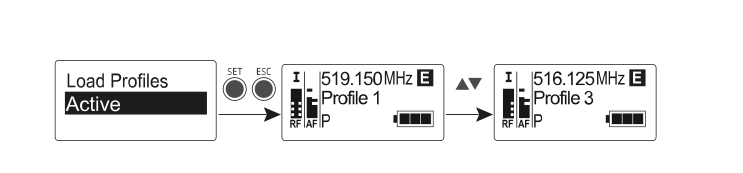
If there is no profile saved, Inactive appears in the Load Profiles menu item. Engineer Mode remains activated, even if you replace the batteries or switch the EK off and on again.