
Home Screen
After you switch on the receiver, the display panel initially displays the Sennheiser logo. After a short time, the home screen is then displayed.
The home screen has three different standard displays.
- On the home screen, press the ESC button to switch between the standard displays.
- In Stereo mode, you can also press the UP/DOWN button to switch between the standard displays.
Frequency/Name standard display
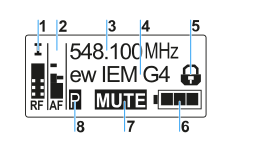
- 1 RF level (radio frequency)
- RF signal level display
- 2 AF audio level (audio frequency)
- Displays the audio level of the received transmitter (separated by channel in Stereo mode).
When the display shows full deflection, the audio input level is excessively high.
- 3 Frequency
- Current receiving frequency
- 4 Name
- Freely selectable name of the receiver
- 5 Lock-off function
- Lock-off function is activated.
- 6 Battery status
- see Battery status
- 7 MUTE muting function
- The transmitter’s RF signal is deactivated, see Mode menu item
- 8 pilot tone P
- P = Activated pilot tone evaluation
Bank/Frequency/Limiter standard display
The Bank/Frequency/Limiter standard display also shows the audio channel (Stereo/Focus) and the limiter.
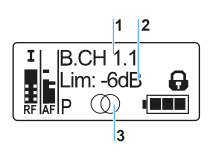
- 1 Frequency bank and channel
- see Frequency Preset menu item
- 2 Limiter
- seeAdvanced -> Limiter menu item
- 3 Audio channel, stereo
- Focus:
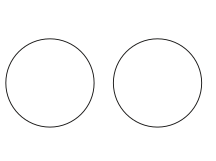
Frequency/High Boost standard display
The Frequency/High Boost standard display also shows the audio channel (Stereo/Focus) and the treble boost.
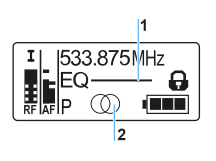
- 1 Treble boost EQ
- see High Boost menu item
- 2 Audio channel, stereo
- Focus: