
Connecting a microphone
We recommend using the following Lavalier microphones and headset microphones with the SK 6000 and SK 6212 bodypack transmitters.
Lavalier microphones:
- MKE 1 (Black 3-Pin) | Lavalier microphone with omni-directional pattern, article no. 502167
- MKE 2 (Black 3-Pin) | Lavalier microphone with omni-directional pattern, article no. 004736
- MKE 40 (Black 3-Pin) | Lavalier microphone with cardioid pattern, article no. 003579
- MKE Essential (Black 3-Pin) | Lavalier microphone with omni-directional pattern, article no. 508251
- MKE Essential (Beige 3-Pin) | Lavalier microphone with omni-directional pattern, article no. 508252
Headset microphones:
- HSP 2 (Black 3-Pin) | Headset microphone with omni-directional pattern, article no. 009862
- HSP 4 (Black 3-Pin) | Headset microphone with cardioid pattern, article no. 009864
- Headmic 1 (Black 3-Pin) | Headset microphone with omni-directional pattern, article no. 506905
- HSP Essential (Black 3-Pin)| Headset microphone with omni-directional pattern, article no. 508247
- HSP Essential (Beige 3-Pin)| Headset microphone with omni-directional pattern, article no. 508248
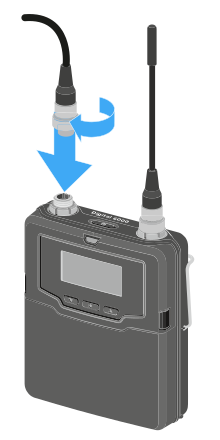
To connect a microphone to the bodypack transmitter:
- Use a 3-pin audio connector to connect the microphone cable to the SK 6000 bodypack transmitter audio socket as shown in the figure.
-
Tightly screw the microphone cable coupling ring onto the audio socket thread of the SK 6000 bodypack transmitter.
For more information about using the particular microphone, see the corresponding instruction manual for the microphone. You can find this in the download section of the Sennheiser website under sennheiser.com/download.