
Cleaning and maintenance
Note the following information when cleaning and maintaining Digital 6000 series products.
| NOTICE | |
|---|---|
- Note the special cleaning instructions below for the following products.
Cleaning the sound inlet basket of the microphone module
- Unscrew the top sound inlet basket from the microphone module by turning it counterclockwise.
-
Remove the foam insert.
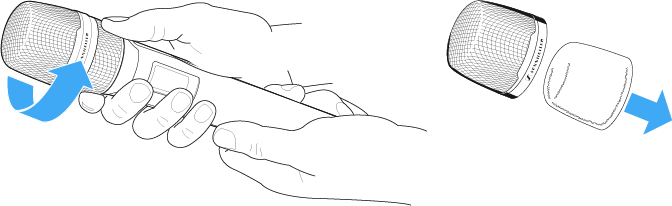
You can clean the sound inlet basket in two ways:
- Use a slightly damp cloth to clean the top sound inlet basket from the inside and outside.
- Use a brush and rinse with clean water.
- If necessary, clean the foam insert with a mild detergent or replace the foam insert.
- Dry the top sound inlet basket and foam insert.
- Reinsert the foam insert.
- Screw the sound inlet basket back onto the microphone module.
From time to time, you should also clean the microphone module contacts:
- Wipe the contacts of the microphone module with a soft, dry cloth.
Cleaning the SK 6000 bodypack transmitter contacts.
- Wipe the contacts with a dry cloth.
Cleaning the L 6000 charger
- Remove all rechargeable batteries from the charging slots.
- Disconnect the L 6000 charger from the power supply system before cleaning.
- Clean the product with a dry cloth.
- In addition, use a brush to remove dust from the charging slots.
- Clean the charging contacts from time to time with a cotton swab, for instance.