
Enlarging/reducing panels
There is a dashed area in the lower right corner of the panel.
To steplessly reduce or enlarge the panels:
- Click on the dashed area.
- Keep the mouse button pressed and drag the panel to the left (= reduce) or to the right (= enlarge).
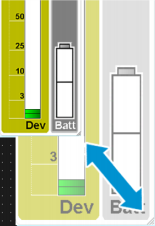
When you considerably zoom out a panel, the scales are hidden to provide a better overview.