Working with the tools

To select a stationary receiver:
You can do the recording with any stationary receiver.
  1. Click on the arrow in the “Receiver” field.
    A list of the connected receivers with their respective frequency ranges appears.
  2. Select the desired receiver by clicking on it.
To preseta start time for the recording:
You can either start the recording immediately, or you can preseta start time
  1. Click on the arrow in the “Set Time” field.
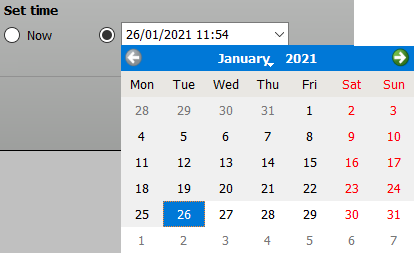
  2. Click on the arrows to the left and right of the month to change the month and the year.
  3. Click on the day to select the date to be entered into the date field.
  4. Enter the time directly in the “Time:” field.
  5. Make sure that all relevant devices for the recording are switched on at that time and that the WSM is running.
    If you want to use the “Spectrum Analyzer” tool during live operation, select a receiver that is not required in the transmission.
To set the recording duration – “RF Level Recorder” only :
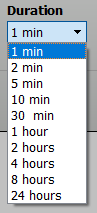
You can select a recording duration from 1 minute to 24 hours.
  1. Click on the arrow in the “Duration” field.
  2. Select the recording duration from the list.