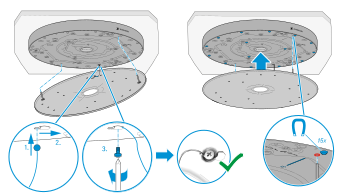
Variant 3: mounted directly below the ceiling
For installation directly below the ceiling, you need the TCC M Plus S-W or TCC M Plus S-B product variant, or the TCC M-H-W or TCC M-H-B ceiling microphone housing.
Screws and anchors for mounting on the ceiling are not included in the scope of delivery. Make sure to use suitable screws and anchors for the installation according to the properties of the room ceiling.
Mounting the ceiling mounting frame
-
Place the screws in the center of the key holes.
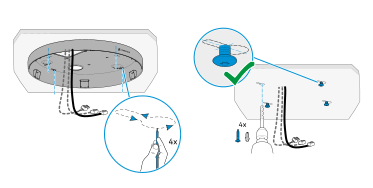
Securing and connecting the microphone
-
Lift the microphone toward the ceiling, pull the installation rope tight and cut off any superfluous length of rope.
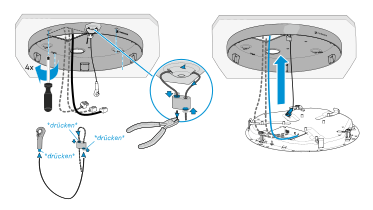
Observe the following information when connecting and routing the cables: Always route the cables carefully, in the form of a loop, within the connection recess. Make sure not to kink the cables in order to avoid cable breaks and damage to the connectors.
Securing the microphone and attaching the front panel
-
Look through the inspection holes to check that the clamps are properly tightened and the microphone is firmly seated in the housing.
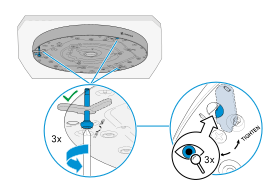
-
Insert the two pins of the retaining plate into the corresponding holes in the microphone (marked in red). The front panel is now held magnetically.