Variant 2: installed flush with Ceiling Tile Element in a dropped/coffered ceiling
The TeamConnect Ceiling M Plus can be installed flush in closed ceilings with the Ceiling Tile Element without having to saw out an existing ceiling panel.
For this, the product variant TCC M CTFP-W or TCC M CT-W is required. Make sure not to install the TeamConnect Ceiling M Plus directly next to lights or other electrical devices in the ceiling.
NOTICE
Danger of property damage if the product should fall
If mounted incorrectly, the product may fall.
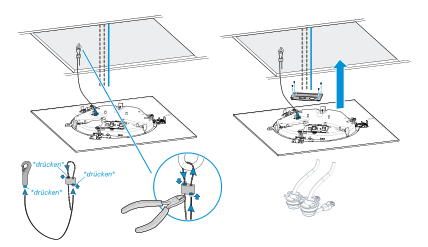
When mounting in the ceiling, always additionally secure the TeamConnect Ceiling Medium Plus against falling, e.g. with the supplied ceiling suspension set TCC M SK (see Variant 4: suspended from the ceiling) and additionally with the supplied suspension cable, which is attached to a ceiling hook and the top of the microphone.
Attaching the ceiling flush mount kit
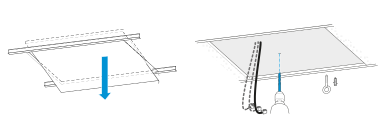
Remove a tile from the ceiling.
Using a suitable anchor, insert an eye bolt into the ceiling to attach the installation rope.
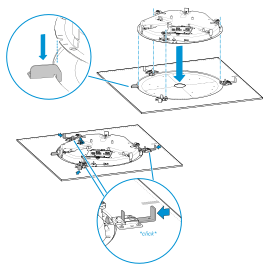
Insert the microphone into the Ceiling Tile plate. Only one position is possible: the metal tab on the plate must be inserted into the corresponding recess on the microphone as shown in the illustration.
Then the microphone must be secured by the three locks on the plate. They must audibly engage with a click.
Securing and connecting the microphone
Install the suspension cable as shown and attach it to the eye bolt and the microphone.