
Routing of AV signals via Dante Controller to TC Bar
To route additional Sennheiser audio devices to the TC Bar, the following steps must be performed:
- Activation of the Dante® protocols in the Control software
- Routing of audio signals in the Dante Controller
Dante Controller is the application used to route AV signals between all Dante®-enabled audio on your network. The application replaces all connections with a computer network, effortlessly sending video or audio over Ethernet cables with perfect digital fidelity.
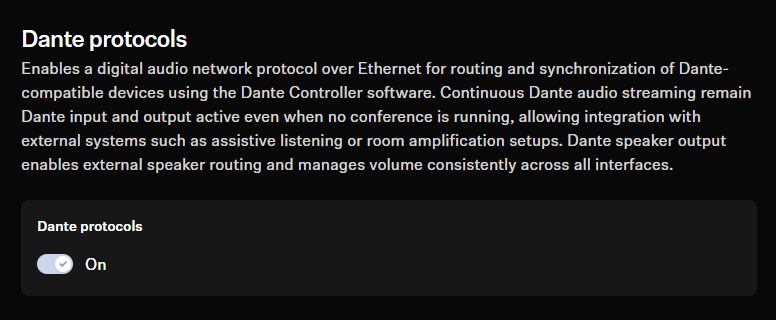
Activating Dante® Protocol for TC Bar
Before routing an external device to the TC bar via Dante®, the required Dante® protocol must be activated in the Control Cockpit.
-
Click on the tab Network and activate the slider for Dante®
Protocols.
Routing TCC M signals to TC Bar
The following settings must be adjusted in the Dante Controller to route signals to the TC Bar:
-
Route the FarEndRefOut of the TC Bar to the FarEndRef of the TCC M.
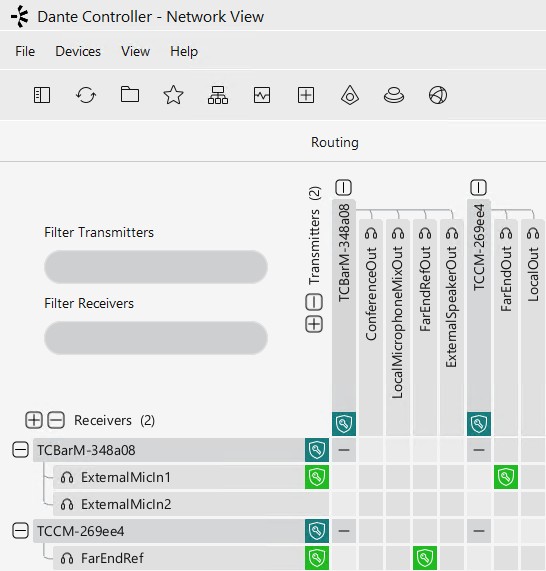
Recommendation: We highly recommend using the beam freeze function of the TCC M microphone. Our tests have shown that the echo suppression in the TC Bar benefits by far using the beam freeze function.
Adapting the Far End Output (TCC M)
The default settings in TCC M are tailored to common use cases. In certain scenarios, you can use the following settings in the Audio tab of Control Cockpit to fine-tune the performance.
-
Adjust the gain in the field Far End Output (digital):
- Increase the gain if the TCC M is very far away from the audience.
- Reduce the gain if the TCC M is very close to the audience.
-
Adjust the sensitivity of the beam freeze in the field Input Level
(Digital):
- Increase the input level under Manual gain to activate the beam freeze earlier for better echo suppression.
- Reduce the input level under Manual gain for better near-end speaker pick up and double talk.
- Choose Automatic if, e.g. the seating in the room changes frequently. This allows the TCC M microphone to adjust itself to the best input level.