
Handling the Automix Priority
The TC Bar has up to two Dante® inputs for external microphone channels (Ext. CH 1 and Ext. CH 2).
The channels allow external devices (e.g. TeamConnect Ceiling Medium) to be connected to the TC Bar via a Dante® network.
The Dante® inputs are managed via an integrated automixer, whereby the priority of the channels, including the internal microphone array, can be set via individual faders.
Reducing the level by the corresponding control fader will add an virtual level reduction to the channel that makes it less likely to be selected by the automixer.
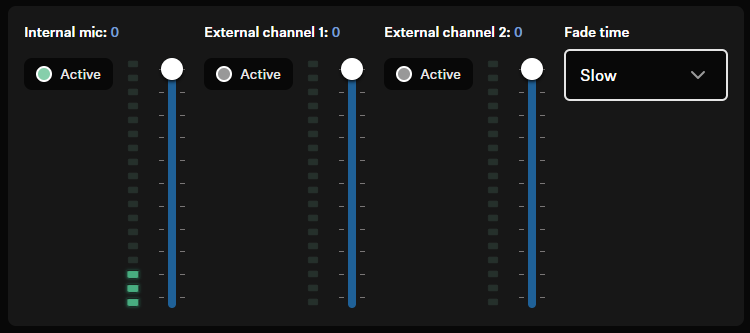
The level meters show the signal level of the inputs and the internal microphone array PRE fader and also PRE virtual level reduction. Moving the faders therefore does not change the displayed levels.
If you want to prioritize a single channel from the selection, you will have to reduce the virtual gain reduction of the other two channels.
Examples:The following table shows examples of which microphone is given priority over other connected microphones depending on the setting.
| Comments | Int. Mic | Ext. CH 1 | Ext. CH 2 |
|---|---|---|---|
|
-30 dB | -60 dB | 0 dB |
|
-60 dB | -10 dB | -30 dB |
|
0 dB | -30 dB | -30 dB |
Best Practice for Handling the Microphone Gain
- Use Ext. CH 1 and Ext. CH 2 for external microphone channels connected via Dante®.
- Don´t change the settings, if no Dante® channels are connected.
- Reduce Int. Mic to -60 dB, if an external device is connected to Ext. CH 1 (for example a TCC M) and you prefer to use the microphone pickup from that device most of the time. You can also disabled the Int. Mic so that Dante® microphone is used all the time.
- When the Int. Mic and CH 2 gain is reduced to -60 dB, it is likely that the TC Bar chooses Ext. CH 1 for the microphone input. It does not mean that the actual microphone gain is reduced to -60 dB.
- If you want to use the TC Bar‘s microphone pickup for people speaking close to the TC Bar but use the external microphone pickup of the external device (e.g. TCC M), simply adjust the priority of the selected microphone within the Automix Priority.
- With Fade Time you can adjust the switching speed between the audio sources connected to the auto mixer.