Using the operating menu of the receiver

Using the buttons for navigation

Press the STANDBY button

  • Short-press: Switches the receiver on
  • Long-press: Switches the receiver off
Short-press the ESC button

  • Navigates to the next higher level in the menu
  • Exits the menu item without storing changes to the settings
Press the ESC button for 3 seconds

  • Returns to the home screen
Press the jog dial

  • Changes from the home screen to the operating menu
  • Calls up the selected menu item
  • Changes to the selected submenu
  • Confirms the selection or the changed setting
Turn the jog dial

  • Switches between the home screen and the secondary home screen
  • Changes to the previous or next menu item
  • Changes the settings of a menu item

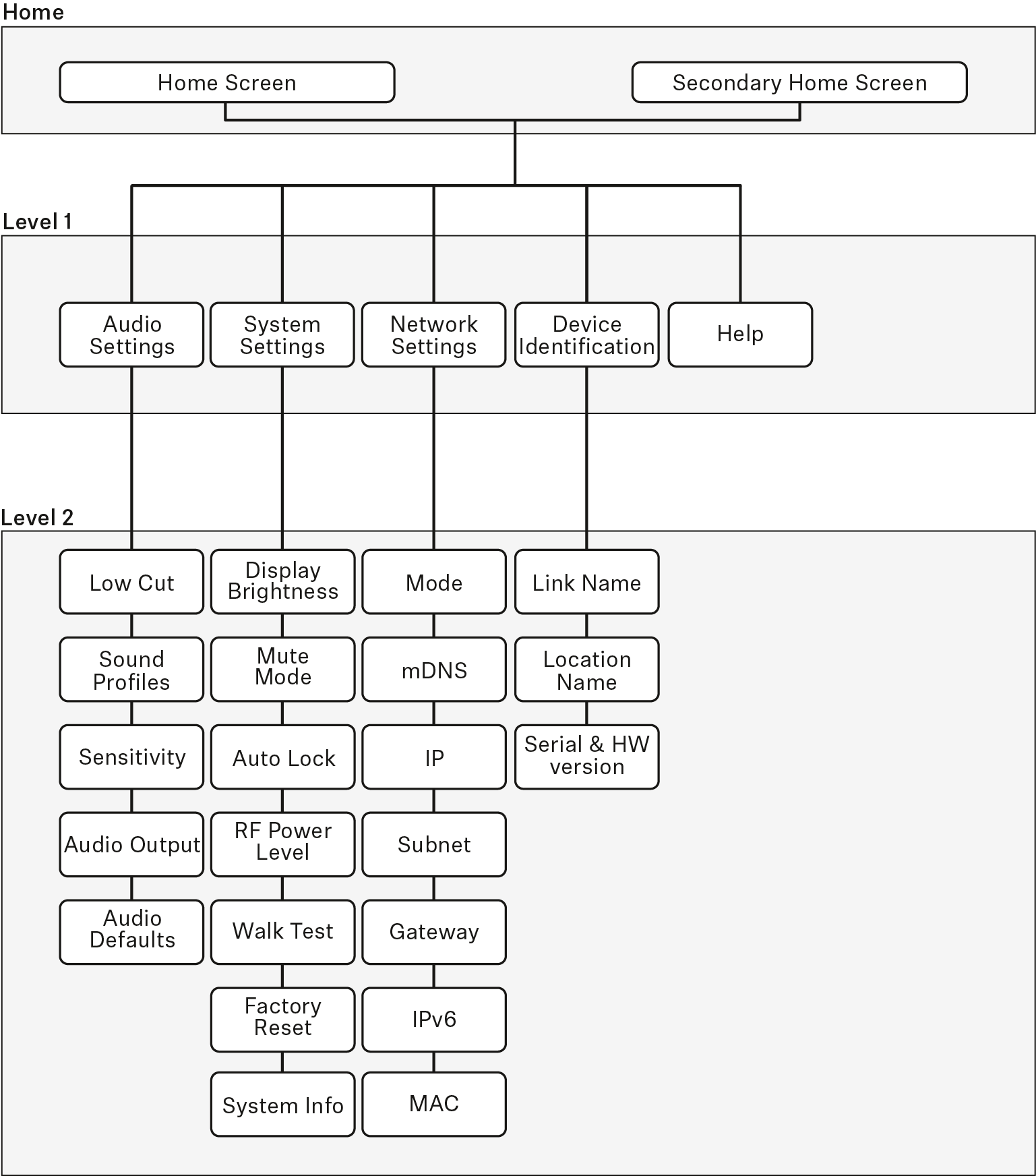
The menu structure of the receiver

Version: Firmware Version 2.6.10


The Audio Settings menu

The Audio Settings menu at menu level 1 allows you to adjust the following settings.

Low Cut
  • On: The low cut filter is activated. Low-frequency noise is filtered out.
  • Off: The low cut filter is deactivated.
Sound Profiles
  • Off: No sound profile is activated.
  • Female Speech: Recommended sound profile for female speakers.
  • Male Speech: Recommended sound profile for male speakers.
  • Media: Recommended sound profile for other audio devices.
  • Custom: 7-band equalizer for manually adjusting the sound settings.
Sensitivity
  • Automatic: The audio sensitivity is automatically adjusted during speech.
  • 0 dB ... -30 dB: The audio sensitivity can be manually adjusted in increments of 6 dB between 0 dB and -30 dB.
Audio Output
  • Level: Slider for adjusting the audio output level of the XLR socket between Mic Level and Line Level.
  • This setting does not affect the RCA output. This output always issues a line signal.
Audio Default
  • Yes: Resets the audio settings (Low Cut and Sound Profiles) to the factory defaults.
  • No: Keeps the current audio settings.

The System Settings menu

The System Settings menu at menu level 1 allows you to adjust the following settings.

Display Brightness
  • Level: Slider for adjusting the display brightness.
Mute Mode
  • Active: The MUTE switch of the paired transmitter is activated and can be used.
  • Deactivated: The MUTE switch of the paired transmitter is deactivated and cannot be used.
  • Push to talk: Press and hold the MUTE switch of the paired transmitter to activate the audio signal (for SL Boundary 114-S DW and SL Tablestand 133/153-S DW only).
  • Push to mute: Press and hold the MUTE switch of the paired transmitter to mute the audio signal (for SL Boundary 114-S DW and SL Tablestand 133/153-S DW only).
Auto Lock
  • On: The automatic lock mode is activated. If no button is actuated on the receiver for approx. 10 seconds, the lock mode is automatically activated.
    • Long-press the jog dial to temporarily deactivate the lock mode.
  • The automatic lock mode is deactivated.
RF Power
  • Automatic: The transmission power is automatically adjusted.
  • Level 1 ... 5: The transmission power can be manually reduced in 5 steps. This function is required for operation in Multi-Room Mode.
Walk Test
Factory Reset
  • Yes: All settings are reset to the factory defaults.
  • No: The settings are retained.
System Info
  • Displays the serial number and the current firmware version of the receiver.

The Network Settings menu

The Network Settings menu at menu level 1 allows you to adjust the following settings.

Mode
  • Automatic: The IP address is automatically assigned using DHCP. If no DHCP server is available, the IP address is assigned by the SL Rack Receiver DW itself.
  • Fixed IP: The IP address has to be entered manually.
mDNS
  • Disabled: Deactivates mDNS to reduce the data volume transferred across the network. This option is recommended for larger systems.
  • Enabled: Activates mDNS to allow for automatic device detection. This option is recommended for smaller systems with up to 30 devices.
IP
  • Input of the IP address in Fixed IP mode
Subnet
  • Input of the subnet mask in Fixed IP mode
Gateway
  • Input of the gateway in Fixed IP mode
IPv6
  • Displays the IPv6 address
MAC
  • Displays the MAC address

The Device Identification menu

The Device Identification menu at menu level 1 allows you to adjust the following settings.

Link Name
  • Input of the name of the radio link between the transmitter and the receiver. This name is also shown on the transmitter's display panel.
Location Name
  • Input of the name of the room in which the receiver is set up.
Serial Number
  • Displays the serial number and the hardware version of the receiver.

The Help menu

The Help menu at menu level 1 allows you to adjust the following settings.

Product Information
  • QR Code with link to the product page of SpeechLine Digital Wireless.
User Manual
  • QR Code with link to download the instruction manual.