Operating the receiver

The receiver’s display is divided into three areas for the receiver and the two transmitters. The different menu items can be opened and settings can be made using different swiping movements. The receiver is operated using the navigation principle shown below.
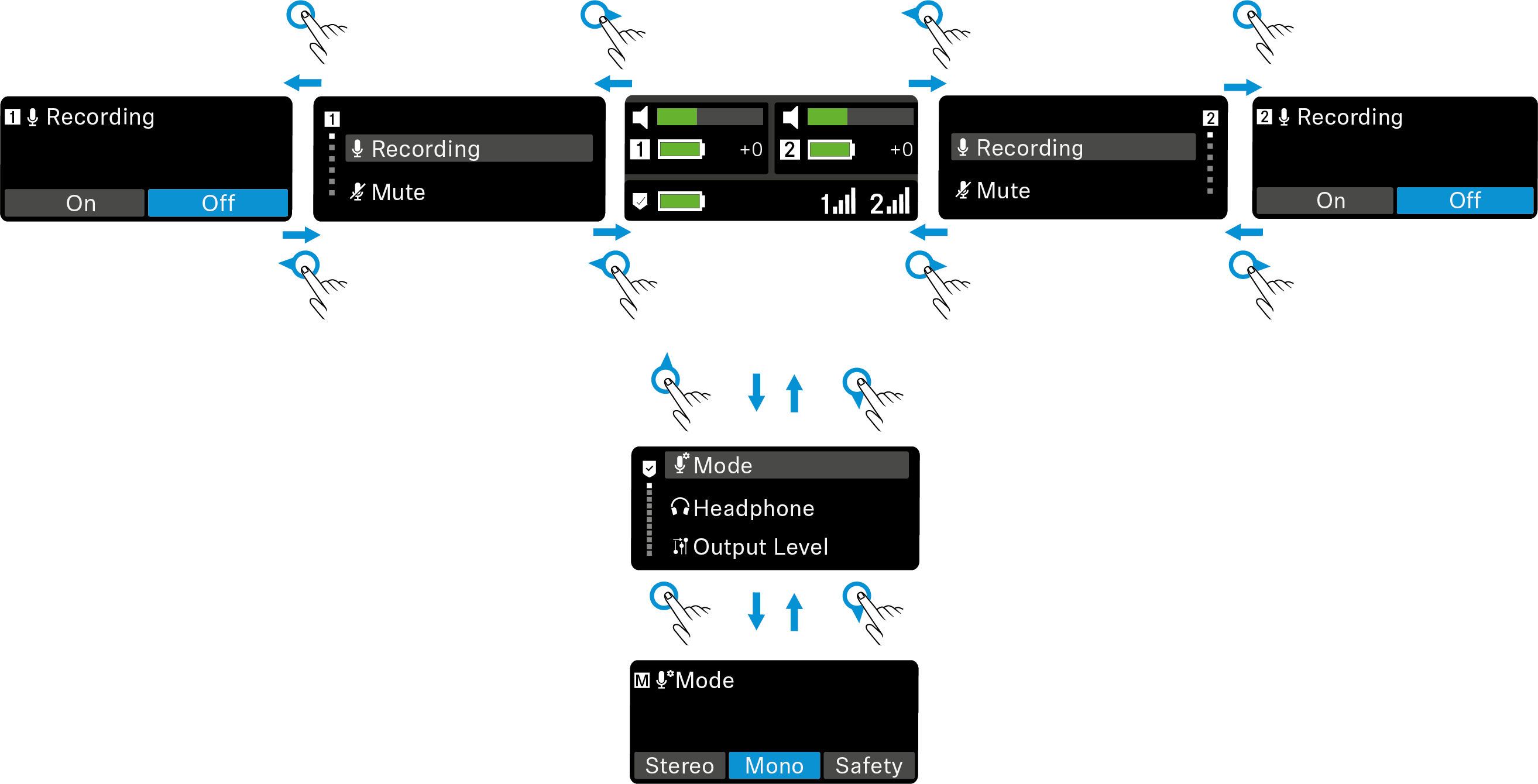


Note:
As an alternative to the swiping movements, you can also go back one menu by briefly pressing the ON/OFF button on the side of the receiver.

Navigation principle

The following gestures are possible on the touch screen:


Swipe up.
  • When on the home screen, swiping up takes you to the receiver menu.
  • Used to navigate through the menus.


Swipe down.
  • When in the receiver menu, swiping down takes you back to the main menu or to the home screen.
  • Used to navigate through the menus.


Swipe left.
  • When on the home screen, swiping left opens the TX2 transmitter menu.
  • When in the TX1 transmitter menu, swiping left takes you back to the main menu or to the home screen.


Swipe right.
  • When on the home screen, swiping right opens the TX1 transmitter menu.
  • When in the TX2 transmitter menu, swiping left takes you back to the main menu or to the home screen.


Tap.
  • A single, short tap can be used to make adjustments or confirm a selection.


Double tap.


Tap and hold.
  • Tap and hold to make adjustments faster than single-tapping multiple times. This is useful for adjusting the brightness or headphones, for example.