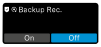
Backup recording mode
The backup recording mode automatically turns on the internal recording when the RF signal weakens or disappears. This feature allows you to ensure that you always have a backup audio recording on your station when needed – without having to manually start the internal recording feature at each session.
Notice
To set backup recording mode:Once a backup recording is triggered, the transmitter's recording LED and the recording icon on the receiver display light up and indicate that an internal recording is in progress.
-
Then tap "On" or "Off" to enable/disable this feature.
Backup recording mode is now enabled/disabled.