
Product overview
Front
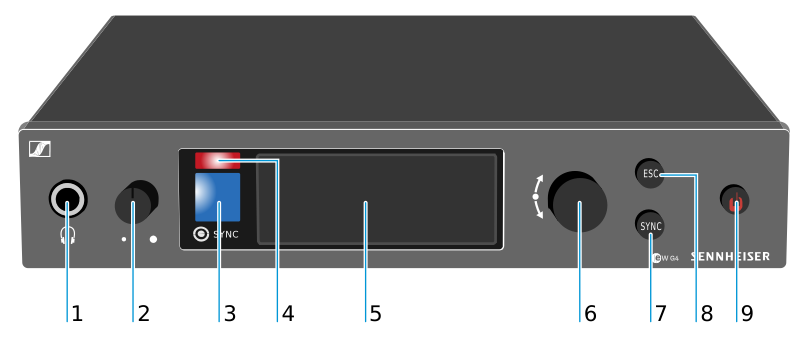
- 1 Headphone socket
- see Using the headphone output
- 2 Volume control for the headphone socket
- see Using the headphone output
- 3 Infrared interface with a blue LED
- see Synchronizing devices
- 4 Red LED for warnings
- see Advanced > Fullscreen Warnings menu item.
- 5 Display
- see Displays on the SR IEM G4 display panel
- 6 Jog dial for navigating through the menu
- see Buttons for navigating the SR IEM G4 menu
- 7 SYNC button
- see Synchronizing devices
- 8 ESC button
- see Buttons for navigating the SR IEM G4 menu
- 9 STANDBY button
- see Switching the SR IEM G4 on and off
Back
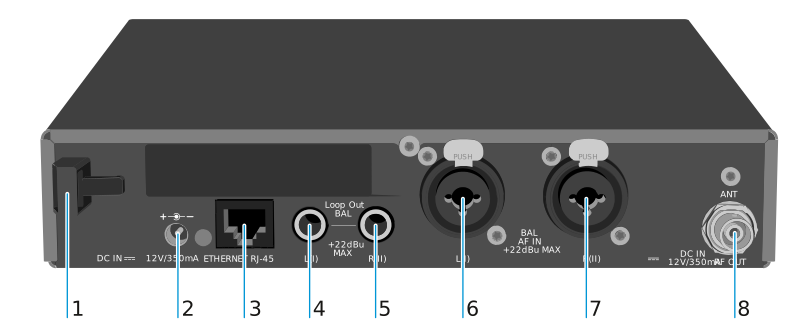
- 1 Strain relief for the cable of the power supply unit
- see Connecting/disconnecting the SR IEM G4 with/from the power supply
- 2 DC IN socket
- For connecting the power supply unit
- 3 LAN connection socket (ETHERNET RJ45)
- see Creating a data network
- 4 6.3 mm jack socket LOOP OUT BAL L(I)
- Audio output, left
- 5 6.3 mm jack socket LOOP OUT BAL R(II)
- Audio output, right
- 6 XLR-3/6.3 mm jack combo socket BAL AF IN L(I)
- Audio input, left
- 7 XLR-3/6.3 mm jack combo socket BAL AF IN R(II)
- Audio input, right
- 8 RF OUT BNC socket
- Antenna output with remote power supply input