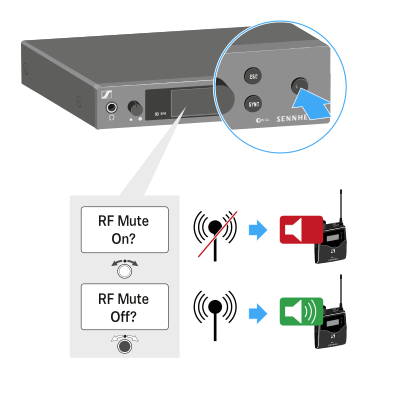
Deactivating the RF signal (RF mute)
To deactivate the RF signal:
-
Press the STANDBY button.
RF Mute Off? appears in the display panel.
-
Turn the jog dial.
RF Mute ON? appears in the display panel.
-
Press the jog dial.
The transmission frequency is displayed, however the transmitter is not transmitting an RF signal. The RF Mute warning appears (see Displays on the SR IEM G4 display panel) and the LED warnings are illuminated (see Product overview).
To activate the RF signal:
-
Press the STANDBY button.
RF Mute Off? appears in the display panel.
-
Turn the jog dial.
RF Mute ON? appears in the display panel.
-
Press the jog dial.
The warning in the display and the LED warnings go out.