Jump to main content
ew G4
ew G4
3rd Party API AVX Control Cockpit Digital 6000 Evolution Wireless Digital Profile Wireless Spectera Solution SpeechLine Digital Wireless TeamConnect Bar TeamConnect Ceiling Medium TeamConnect Ceiling 2 Wireless System Manager ...alle anzeigen
  • Product information
  • User manual
  • Specifications
  • Contact
  1. Home
  2. User manual

    Starting up and operating devices of the ew G4 series.

  3. SK 100 G4 bodypack transmitter
  4. Setting options in the menu

    In the SK 100 G4 menu, you can configure the following settings.

  5. Advanced menu item

    In the Advanced submenu you can configure enhanced settings.

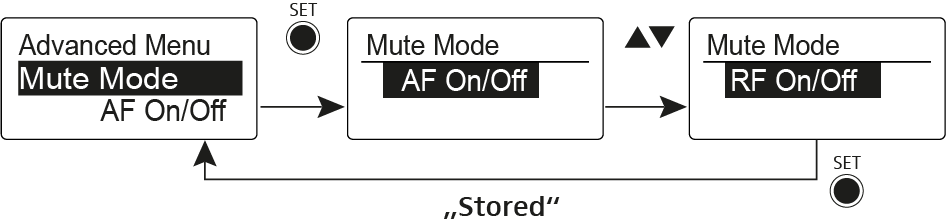
  6. Advanced > Mute Mode menu item

    Configuring the MUTE switch
  • User manual

    Starting up and operating devices of the ew G4 series.

    • EM 100 G4 rack receiver
    • SKM 100 G4 | SKM 100 G4-S handheld transmitter
    • SK 100 G4 bodypack transmitter
      • Product overview
      • Inserting and removing the batteries/rechargeable batteries
      • Connecting a microphone to the bodypack transmitter
      • Connecting an instrument or line source to the bodypack transmitter
      • Attaching the bodypack transmitter to clothing
      • Switching the bodypack transmitter on and off
      • Muting the bodypack transmitter (AF mute)
      • Deactivating the RF signal (RF mute)
      • Lock-off function
      • Displays on the bodypack transmitter display panel

        You can view the following information on the transmitter display.

      • Buttons for navigating the menu
      • Setting options in the menu

        In the SK 100 G4 menu, you can configure the following settings.

        • Sensitivity menu item

          Adjusting the input sensitivity – AF audio level

        • Frequency Preset menu item

          Manually selecting a frequency bank and channel

        • Name menu item

          Entering names

        • Auto Lock menu item

          Switching the automatic lock-off function on and off

        • Advanced menu item

          In the Advanced submenu you can configure enhanced settings.

          • Advanced > Tune menu item

            Configuring the transmission frequency and frequency bank U

          • Advanced > Mute Mode menu item

            Configuring the MUTE switch

          • Advanced > Cable Emulation menu item

            Emulating a guitar cable

          • Advanced > Pilot Tone menu item

            Activating/deactivating pilot tone transmission

          • Advanced > LCD Contrast menu item

            Adjusting the contrast of the display panel

          • Advanced > Reset menu item

            Resetting the bodypack transmitter

          • Advanced > Software Revision menu item

            Show software revision

    • EM 300-500 G4 rack receiver
    • SKM 300 G4-S handheld transmitter
    • SKM 500 G4 handheld transmitter
    • SK 300 G4-RC bodypack transmitter
    • SK 500 G4 bodypack transmitter
    • EK 100 G4 diversity receiver
    • SKP 100 G4 plug-on transmitter
    • EK 500 G4 diversity receiver
    • SKP 500 G4 plug-on transmitter
    • Establishing a radio link
    • Synchronizing devices
    • ASA 214 antenna splitter
    • Cleaning and maintenance

      Note the following information when cleaning and maintaining products of the ew G4 series.

Advanced > Mute Mode menu item

Configuring the MUTE switch


AF On/Off mode
  • If set to position MUTE, the audio signal is muted
RF On/Off mode
  • If set to position MUTE, the RF signal is deactivated
Disabled mode
  • No function
You can find information about operating the mute switch under Muting the bodypack transmitter (AF mute) and Deactivating the RF signal (RF mute).
v1.1 | 12/2025
English Deutsch
© Sennheiser electronic SE & Co. KG | Am Labor 1 | 30900 Wedemark | Germany
Wählen Sie hier Ihre Sprache aus