
Soundcheck standard display
The Soundcheck standard display shows the transmission quality between the transmitter and the receiver.
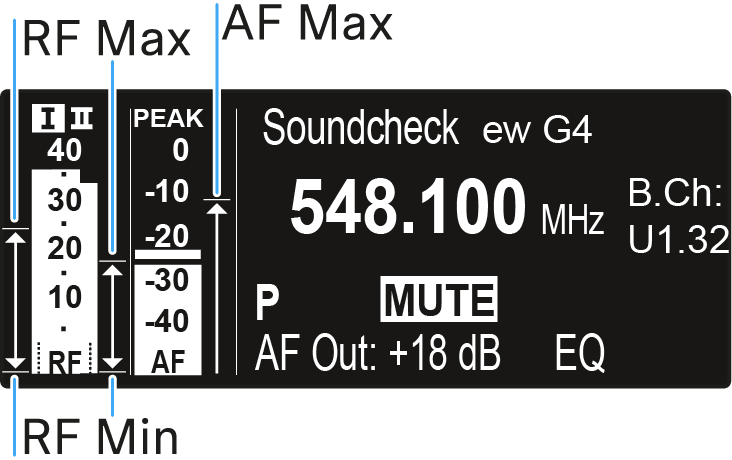
By doing a soundcheck, you can ensure adequate transmission quality in the entire area in which you want to use the transmitter. You can do the soundcheck without the help of another person.
With the transmitter, walk up and down the area in which you want to use the transmitter.
The receiver records the following parameters:
RF Min
- Minimum RF signal level
- must be well above the squelch threshold level for one of the two antennas
- Ways to optimize:
- Check that the antennas and the antenna cables are correctly connected.
- Improve the position of the antennas.
- If necessary, use an antenna booster.
RF Max
- Maximum RF signal level
- both antennas should reach 40 dBµV
- Ways to optimize:
- Check that the antennas and the antenna cables are correctly connected.
- Improve the position of the antennas.
- If necessary, use an antenna booster.
AF Max
- Maximum audio level
- Ways to optimize:
- On your transmitter, adjust the audio level as high as possible without the display for the audio level showing full deflection (AF Max is at a level with the PEAK display). See AF Out menu item.