Creating a data network
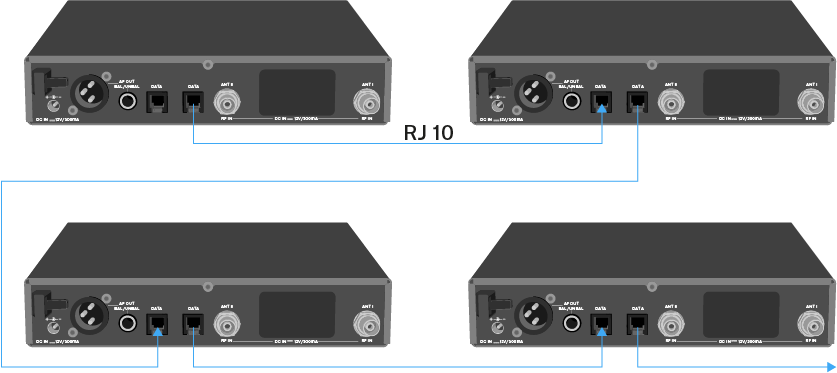
You can cascade multiple EM 100 G4s to a multi-channel system using the two DATA RJ-10 interfaces (up to 12 receivers). You can perform a frequency setup for the entire multi-channel system via this data network using the Easy Setup function.
The setup only works when all of the receivers have the same frequency range.
-
Connect the receivers to create a multi-channel system using the supplied RJ-10 cables as shown in the diagram.
Both RJ-10 sockets are interchangeable. There is no set order for cabling.
You can find more information about the Easy Setup function under Easy Setup menu item.
Setting up a multi-channel system with more than 12 receivers
You can use the Easy Setup function to automatically set up a maximum of 12 receivers.
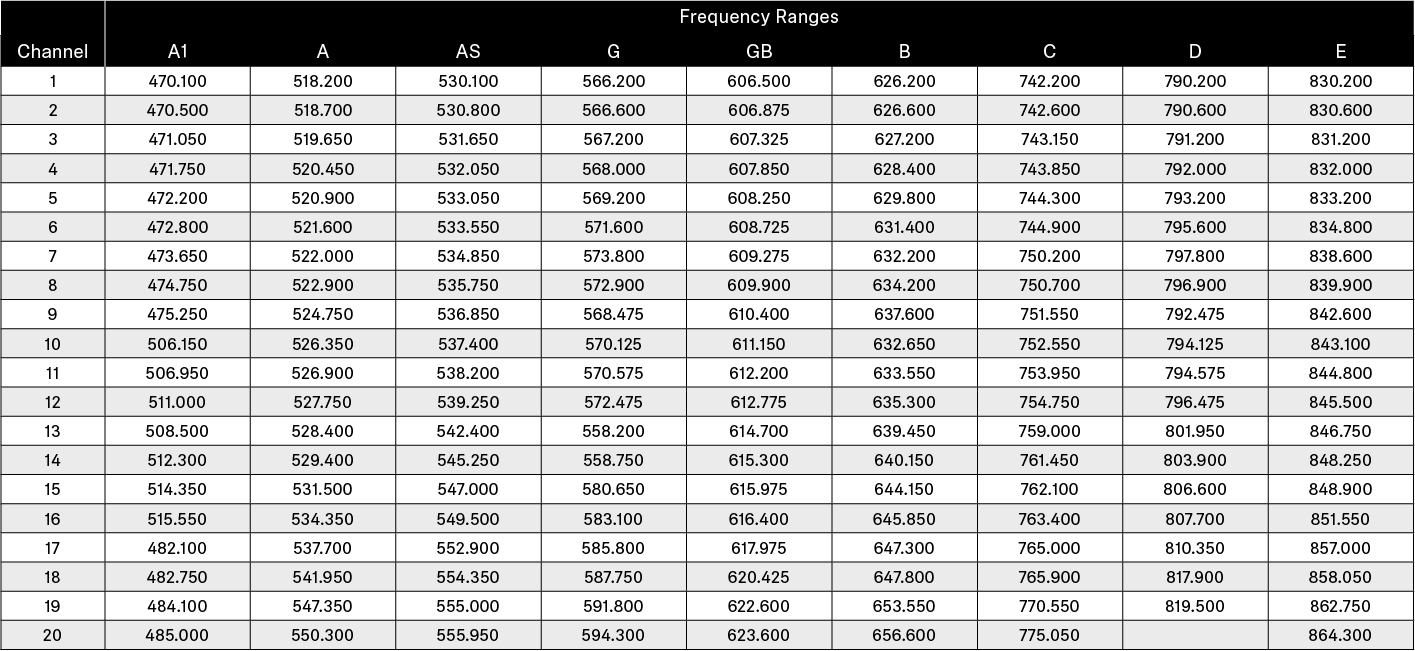
If you assign the frequencies manually, however, you can use up to 20 receivers in a multi-channel system (not possible in the TH, JB, K+ and 1G8 frequency ranges).
-
Use the frequencies from the following table.