Jump to main content
XSW IEM
XSW IEM
3rd Party API AVX Control Cockpit Digital 6000 Evolution Wireless Digital Profile Wireless Spectera Solution SpeechLine Digital Wireless TeamConnect Bar TeamConnect Ceiling Medium TeamConnect Ceiling 2 Wireless System Manager ...alle anzeigen
  • Product Information
  • User Manual
  • FAQ
  • Technical Specifications
  • Regulatory Information
  • Contact
  1. Home
  2. User Manual

    Starting up and operating devices of the XSW IEM line.

  3. XSW IEM EK bodypack receiver
  4. Product overview
  • User Manual

    Starting up and operating devices of the XSW IEM line.

    • XSW IEM EK bodypack receiver
      • Product overview
      • Inserting and removing the batteries/rechargeable batteries

        You can use the receiver with batteries (AA, 1.5 V).

      • Connecting earphones
      • Attaching the receiver to your clothing
      • Replacing the belt clip
      • Switching the receiver on and off
      • LED indicators
      • Display on the display panel
      • Battery status

        You can see the current charging status of the batteries on the receiver’s display panel.

      • Buttons for navigating the menu
      • Finding an interference-free frequency (frequency test)
      • Performing a soundcheck
      • Setting options in the menu
    • XSW IEM SR stereo transmitter
    • Establishing a radio link
    • Synchronizing devices
    • Cleaning and Care

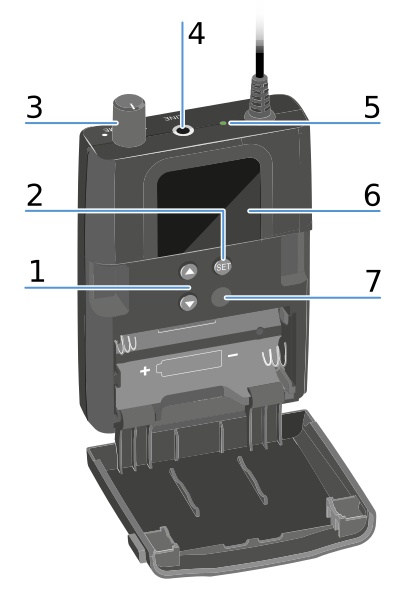
Product overview


1 UP/DOWN buttons
See Buttons for navigating the menu
2 SET button
See Buttons for navigating the menu
3 Volume control with on/off switch
Switch the receiver on/off
See Switching the receiver on and off
4 PHONES 3.5 mm jack
Jack for connecting earphones
See Connecting earphones
5 Operation and battery indicator
See Switching the receiver on and off
See LED indicators
6 Display panel
See Display on the display panel
7 Infrared interface
See Synchronizing devices
v1.4 | 03/2026
English Deutsch Français Español Português
© Sennheiser electronic SE & Co. KG | Germany |
Wählen Sie hier Ihre Sprache aus