
Claiming the TC Bar for a specific Control Cockpit instance (network solution)
The TC Bar is delivered with password protection for the configuration. This device must be claimed by a Control Cockpit instance before you can view and modify its configuration.
Please note that the device must be claimed before its full range of functions is available (see Operation as a networked conference system).
Registering the device serves to link the device to the Control Cockpit and thus prevent the device from being controlled over the network without authentication. The device is controlled by means of encrypted communication and only with the password you have set.
To set up the device’s initial configuration, you have to connect directly to the network via the LAN cable (RJ45).
Use only network cables with the standard
CAT5e (F/STP) or better.
To assign the TC Bar to a Control Cockpit instance:
-
Open the Control Cockpit and click on the view Device List.
The new unclaimed device is automatically detected.
 If the device is not displayed in the device list, carry out the following steps:
- After a minute has elapsed, update the Cockpit using the switch Refresh list.
- Add the TC Bar manually by entering an IP address (see Manually adding the TC Bar to the Control Cockpit).
-
Click Claim device and enter the device’s default password.
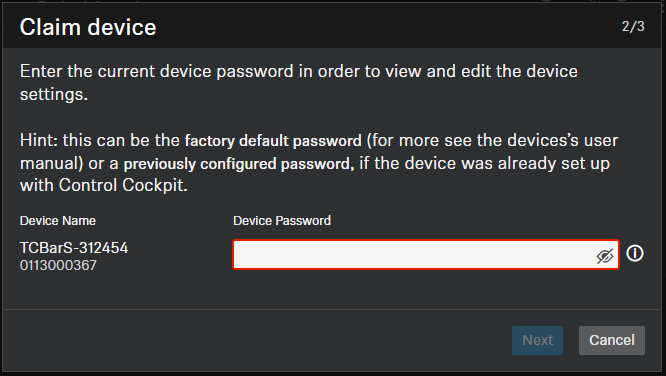
You can find the default password on the type plate of the device under Default PW.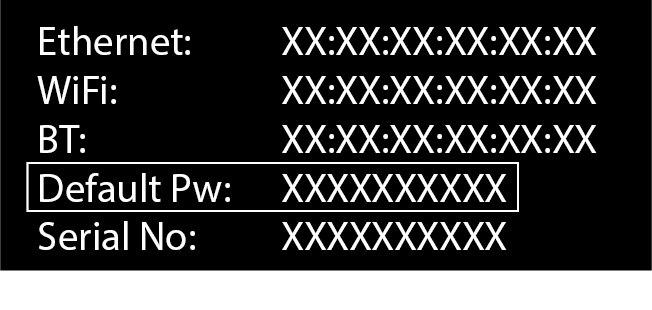 If the device has been previously claimed by another instance of Control Cockpit, enter the password set previously. If you do not remember the password set previously, reset the device to its factory settings (see Resetting the TC Bar to factory settings) and enter the default password again.To ensure secure access to the device, you will immediately be prompted to enter a new password.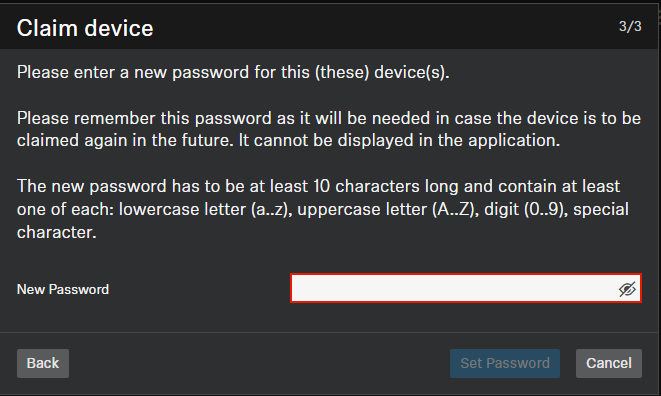
Please note that the new password must meet the following requirements:- At least ten characters
- One lowercase letter (a...z)
- One uppercase letter (A...Z)
- One number (0...9)
- One special character (!#$%&()*+,- ./:;<=>?@[]^_{|}~)
- Maximum length: 64 characters