Jump to main content
TeamConnect Bar
TeamConnect Bar
3rd Party API AVX Control Cockpit DeviceHub Digital 6000 Evolution Wireless Digital Profile Wireless Spectera SpeechLine Digital Wireless TeamConnect Bar TeamConnect Ceiling Medium TeamConnect Ceiling M Plus TeamConnect Ceiling 2 ...alle anzeigen
  • Product information
  • Instruction manual
  • Knowledge base
  • Specifications
  • Regulatory information
  • Contact
  1. Home
  2. Instruction manual

    Detailed description of mounting, commissioning, operation, maintenance, and transport of the product.

  3. Mounting

  • Instruction manual

    Detailed description of mounting, commissioning, operation, maintenance, and transport of the product.

    • Quick start

      The TC Bar can be connected in just a few steps and used immediately.

    • Product Overview

    • Mounting

      • Safety instructions for mounting

        Read and follow these safety instructions for mounting. Keep the safety instructions and always include them when passing the mounting kit on to third parties.

      • Mounting the TC Bar on the wall

        The mounting kit included in the delivery can be used to mount the TC Bar to the wall above or below the screen.

      • Mounting the TC Bar on a table

        The mounting kit included in the delivery can be used to mount the TC Bar to a table or sideboard.

      • Mounting the TC Bar on a tripod

        The mounting kit included in the delivery can be used to mount the TC Bar on a tripod.

      • Mounting the TC Bar on a VESA mount

        The mounting kit included in the delivery can be used to mount the TC Bar on a VESA mount.

      • Mounting the accessories bracket

        The bracket for the remote control and the lens cap can be placed on a table or mounted on a wall.

    • Start-up the product

      This chapter describes the initial configuration and commissioning of the TC Bar.

    • Usage

      The following chapters contain additional information on operating the TC Bar.

    • Monitoring & Controlling

      The TC Bar provides comprehensive monitoring and control functions that enable users to efficiently manage audio and video settings across various applications and interfaces.

    • Product care

      Fundamental care and maintenance practices to help ensure the longevity and proper functioning of the device.

Mounting

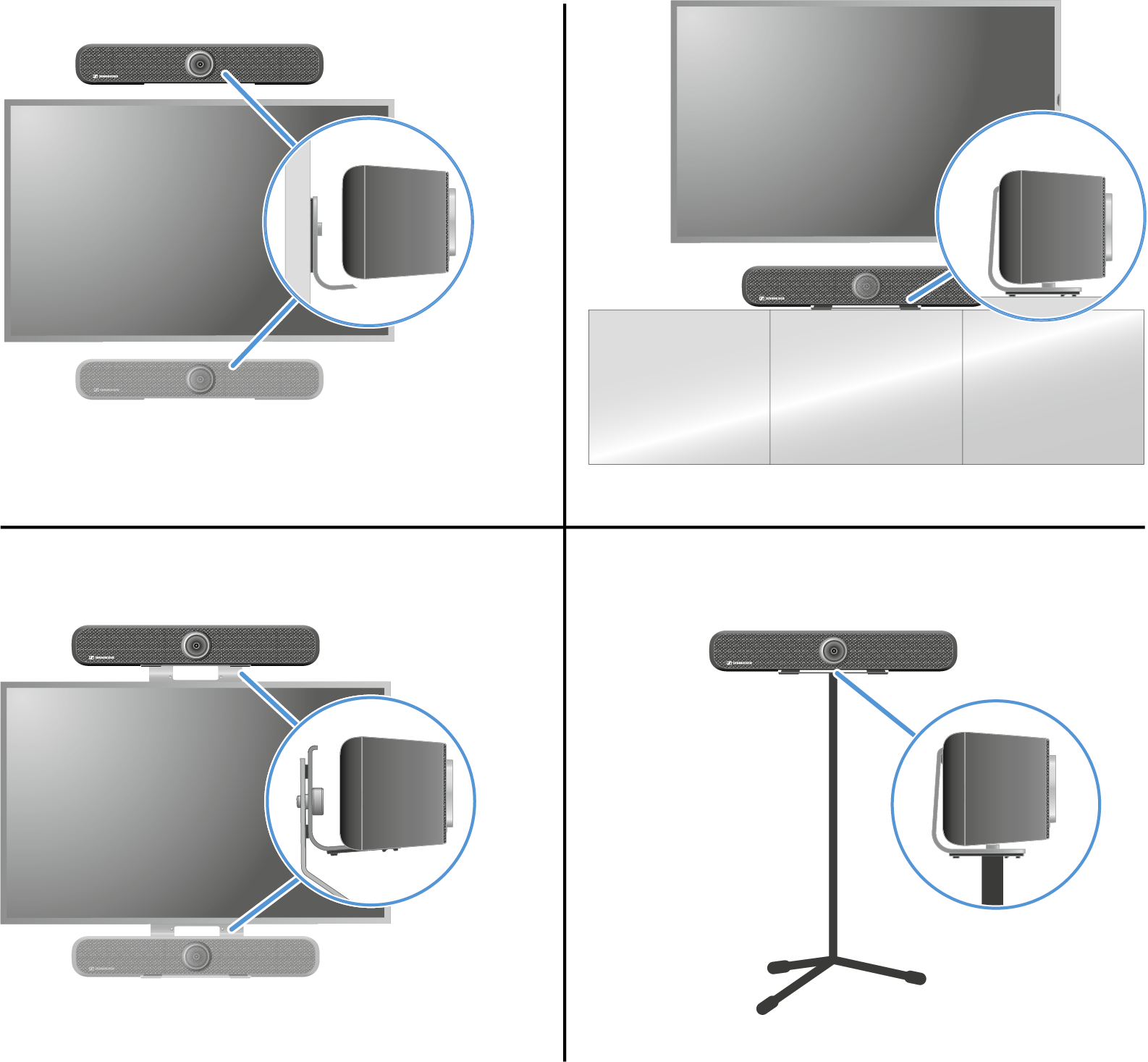
There are various mounting options for attaching and positioning the TC Bar in a room:
  • Mounting on the wall (bracket included in the scope of delivery)
  • Mounting on the table (bracket included in the scope of delivery)
  • Mounting on a VESA mount (optional accessories required, see Accessories)
  • Mounting on a tripod (bracket included in the scope of delivery, but not the tripod)

Related information
  • Monitoring & Controlling
    The TC Bar provides comprehensive monitoring and control functions that enable users to efficiently manage audio and video settings across various applications and interfaces.
v3.1 | 07/2026
English Deutsch Français Español Italiano Português 简体中 日本語 한국어
© Sennheiser electronic SE & Co. KG | |
Wählen Sie hier Ihre Sprache aus