
Connecting a microphone / instrument
You can connect a microphone or instrument to the SEK.
To connect a microphone to the SEK:
- Use a 3-pin audio connector to connect the microphone cable to the SEK microphone / instrument input socket.
-
Screw the plug’s coupling ring onto the microphone / instrument input thread of
the SEK.
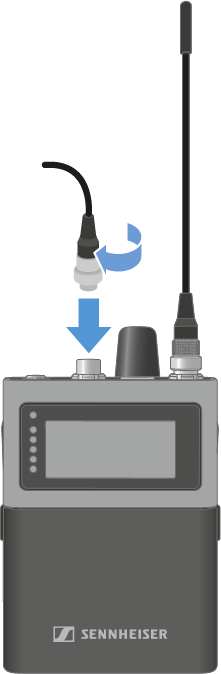
To connect a instrument to the SEK:
- Use a 3-pin audio connector to connect the instrument cable to the SEK microphone / instrument input socket.
-
Screw the plug’s coupling ring onto the microphone / instrument input thread of the SEK.
The automatic mic/line detection is based on power consumption and is optimized for use with Sennheiser microphones. Because third‑party microphones vary widely, reliable detection cannot always be ensured.
To select the auto input manually, see Selecting the Mic/Line input.
The following microphones are compatible:
- Headmic 1 (3-Pin) | Headset microphone with omni-directional pattern
- Headmic 4 (3-Pin) | Headset microphone with cardioid pattern
- HM 200 (3-Pin) | Headset microphone with omni-directional pattern
- HSP 2 (3-Pin) | Headset microphone with omni-directional pattern
- HSP 4 (3-Pin) | Headset microphone with cardioid pattern
- ME 102 (3-Pin) | Mini-microphone with omni-directional pattern
- MKE 1 (3-Pin) | Lavalier microphone with omni-directional pattern
- MKE 2 (3-Pin) blue label | Lavalier microphone with omni-directional pattern
- MKE 40 (3-Pin) | Lavalier microphone with cardioid pattern
- MKE Essential (3-Pin) | Lavalier microphone with omni-directional pattern