HS 2
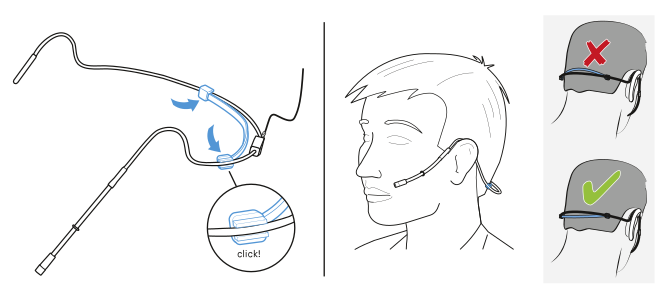
To attach the headband:
- Slide the ends of the headband into the bracket until they audibly click into place.
-
Make sure the headband sits below the bracket.
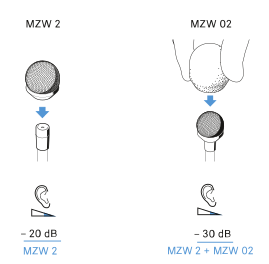
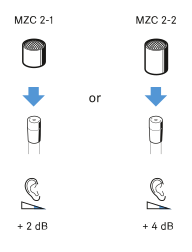
To use the frequency response caps:
The frequency response caps allows you to adjust the microphones sensivity in the presence area (see specifications HS 2).
-
Slip the frequency response cap onto the microphone until it locks into place with an audible click.
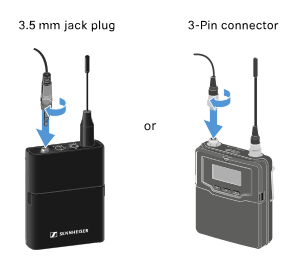
To connect the microphone:
- Insert the cable’s plug into the socket of the bodypack transmitter.
-
Screw the plug’s coupling ring onto the audio socket thread of the bodypack transmitter.
To adjust the microphone:
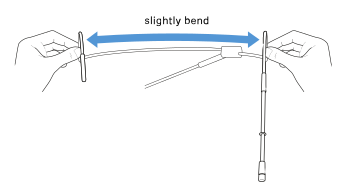
-
If necessary, gently bend the neckband.
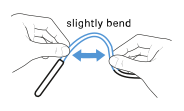
-
If necessary, gently bend the ear hook.
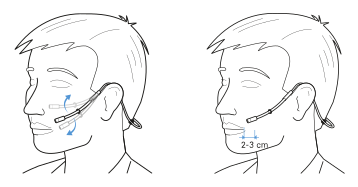
To position the microphone:
-
Slide the microphone boom forward or backward in the clips so that the microphone is 2 to 3 cm from the corner of your mouth.
To use the windshield:
-
Slide the windshield (optional accessory) over the microphone head.