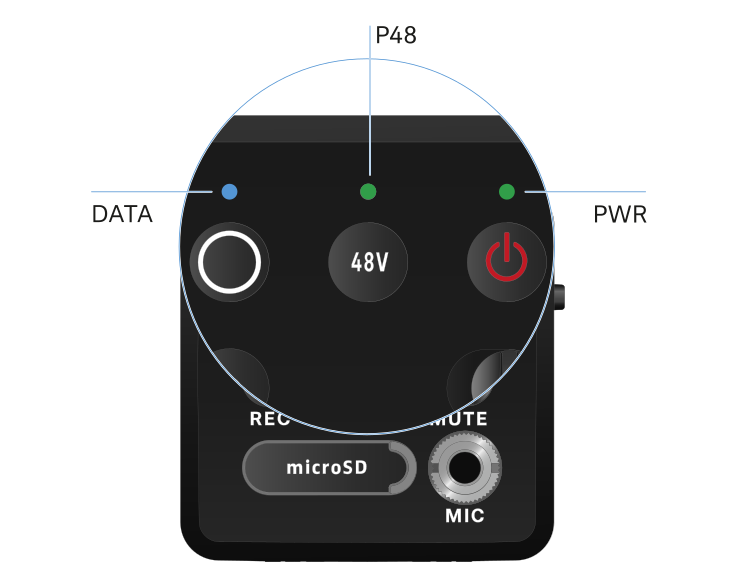
Meaning of the LEDs


The LINK, DATA and POWER LEDs on the front of the receiver can indicate the following information.

PWR LED

The PWR LED provides information about the status of the radio link between the transmitter and receiver, as well as status information about the battery charge.

The LED is green:

  • The link between the transmitter and receiver is established.
  • The audio signal is active.
The LED is yellow:

  • The link between the transmitter and receiver is established.
  • The audio signal is muted.
The LED is flashing yellow:

  • The link between the transmitter and receiver is established.
  • The audio signal is overdriven (clipping).
The LED is continuously red:

  • No link between the transmitter and receiver.
The LED is flashing red:

  • The battery/rechargeable battery is low.

DATA LED

The DATA LED provides information on the receiver’s Bluetooth Low Energy link to the Smart Assist app and on the synchronization of transmitters and receivers.

The LED is flashing blue:

  • The Bluetooth Low Energy link is being established between the receiver and a smartphone or tablet with the Smart Assist app.

or

  • The receiver is being synchronized with a transmitter.
The LED is blue:

  • The firmware is being updated.
The LED is off:

  • Normal operation
  • There is currently no active data link.

P48 LED

The P48 LED indicates whether phantom power P48 is activated.

The LED is green:

  • phantom power P48 is active.

RECORDING LED

The RECORDING LED indicates the status of the recording or a possible malfunction.

The LED remains lit:

  • Recording is active.
The LED flashes slowly:

  • Action is in progress, such as formatting the memory card.
The LED flashes rapidly:

  • Error. There are several possible reasons why an error would be displayed:
    • Memory card not inserted or faulty
    • A current recording has less than 10 minutes (= ~81 MB of disk space) of time remaining
    • Less than 3 minutes (= ~24 MB of disk space) of recording time remaining when starting a new recording (recording stops)
    • Write error
    • Buffer exceeded
We recommend fully formatting the memory card using your PC (do not select “Quick format”).