Connecting antennas
You can operate the EM 6000 with the supplied rod antennas or using remote antennas.
We recommend using remote antennas. You can also find useful information about using antennas under Recommendations for using antennas.
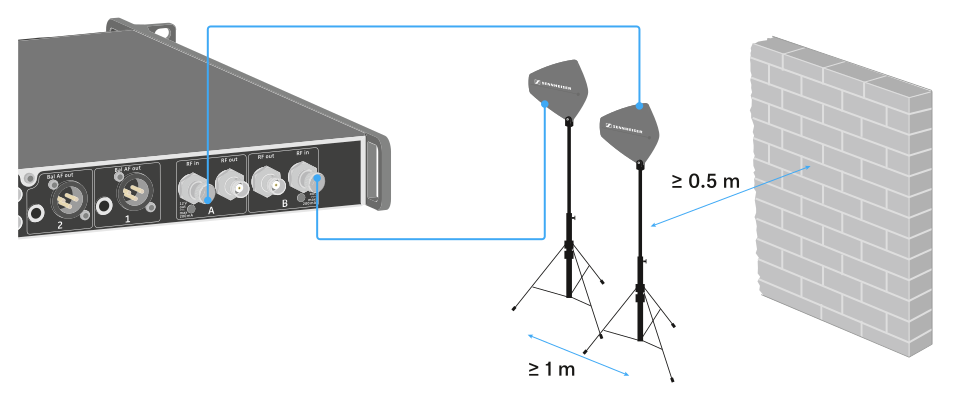
To connect remote antennas:
-
Connect the second antenna to the RF in socket for Antenna B on the rear side of the EM 6000.
-
Activate the booster feed in the EM 6000 menu if you are using active antennas. See System -> Booster Feed menu item. Alternatively, use an external antenna amplifier.
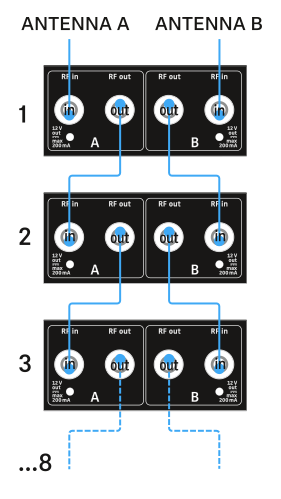
For larger 4-channel systems, you can cascade up to 8 receivers without using additional antenna splitters and you then require only one pair of antennas.
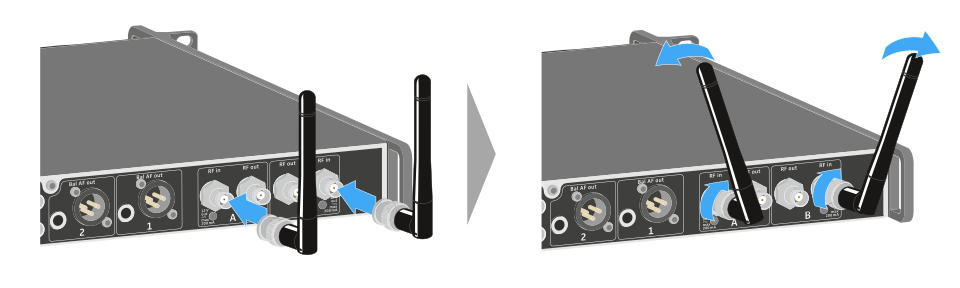
To connect the supplied rod antennas:
-
Gently angle the rod antennas to the left and right as shown in the figure.