Editing and deleting rooms
Learn how to edit or delete created rooms.
To make changes to your location structure:
-
Under your location, click on Manage locations &
rooms.

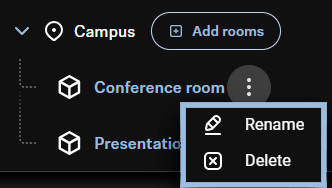
A modal opens in order to manage existing locations and rooms. Here you can add, delete, or rename both locations and rooms.When you delete a location that has rooms assigned to it, those rooms will also be removed. If you add a new location beneath an existing location that has assigned rooms, those rooms will automatically transfer to the new lower-level location.Different than locations, rooms can also be edited and deleted directly from the location structure list. -
Click on the
 next to the
corresponding room and choose the appropriate action from the drop-down
menu.
next to the
corresponding room and choose the appropriate action from the drop-down
menu.