
Product overview
Front
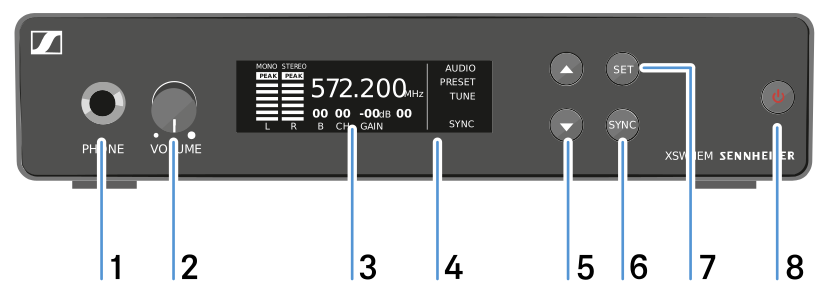
- 1 Headphone socket
- See Using the headphone output
- 2 Volume control for the headphone socket
- See Using the headphone output
- 3 Display panel
- See Display on the display panel
- 4 Infrared interface
- See Synchronizing devices
- 5 UP and DOWN buttons for navigating the menu
- See Buttons for navigating the menu
- 6 SYNC button
- See Synchronizing devices
- 7 SET button
- See Buttons for navigating the menu
- 8 STANDBY button
- See Switching the transmitter on and off
Back
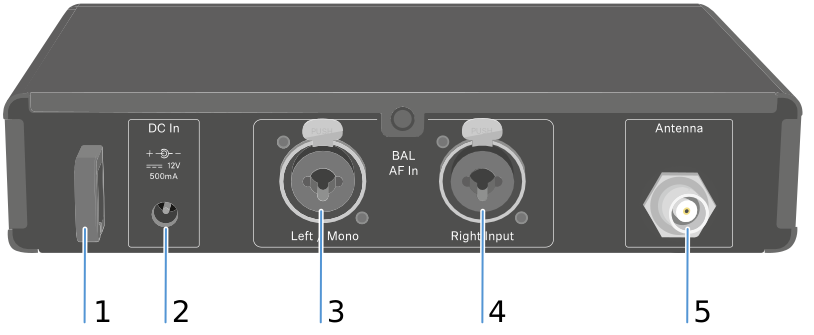
- 1 Strain relief for the connection cable of the power supply unit
- See Connecting/disconnecting the transmitter to/from the power supply system
- 2 DC IN socket
- For connecting the power supply unit
- 3 BAL AF In L XLR-3/6.3 mm jack combo socket
- Audio input, left
- 4 BAL AF In R XLR-3/6.3 mm jack combo socket
- Audio input, right
- 5 Antenna BNC socket
- Antenna output with remote feed input