
Transferring the configuration to the devices
To change to Online mode:
-
Click on “System” > “Online mode”.
You can use either the parameters from the offline configuration or the device parameters.
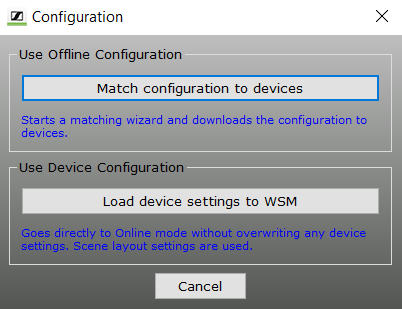
If you want to use the device parameters:
If you want to transfer the set parameters from the offline configuration:
-
Click on “Match configuration to devices”.
The connected devices are searched. The following window appears.

The left-hand list displays the pre-configured devices (“Offline Configuration”). The right-hand list displays all currently connected devices. The device assignment appears in the “Comparison result” window.
The assigned devices are highlighted in the list on the left.
- Green: Configuration matches the connected device.
- Orange: Channel bank of the device does not match the configuration. A manual check of the device is necessary.
- Red: No suitable device found (e.g. differing frequency range).
- Black: Device found on a different port and assigned automatically.
If devices are marked black or red, you can:
- re-connect the receivers according to the configuration,
- change the configuration (“< Back”).
To connect the devices according to the configuration: