
Audio Setup
The following settings can be managed via the audio setup section.

Sound Profile
Sound profiles are presets that are optimized for the intended mounting options.
- Wallmount
- Table Top
- Under Display
- Above Display
- Free Standing
- Custom
Internal Microphone Noise Gate
Noise Gate:
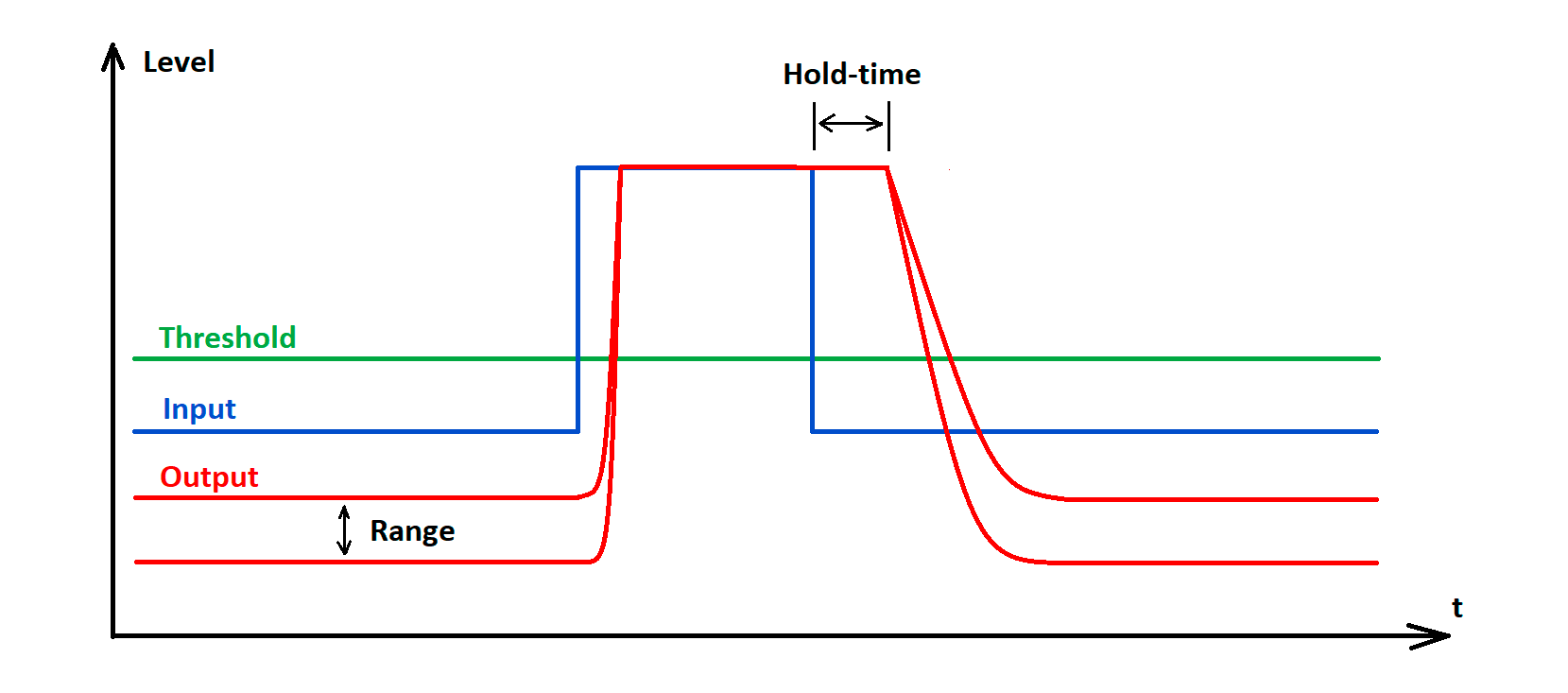
Noise Gate can be activated to avoid amplification of background noise, e.g. during pauses in speech.
Threshold:
The Noise Gate will open the audio of the microphone output only after the predefined threshold value of the needed microphone has been reached. With the slider you can adjust the minimum threshold level from -70 dB to -30 dB in steps of 1 dB.
Hold Time:
The Hold Time sets the duration until the noise gate is activated, e.g. during speech pauses. With the slider you can adjust the duration time from 100 ms to 500 ms in steps of 50 ms.
Range
The 'Range' parameter defines the degree of noise suppression below the set threshold for the entire Noise Gate. The parameter can be set in steps of 1 dB between 0 dB (no suppression) and 80 dB (the level is reduced by 80 dB below the threshold and after the 'attack time').
Automix Priority
The TC Bar has up to two Dante® inputs for external microphone channels (Ext. CH 1 and Ext. CH 2). The channels allow external devices (e.g. TeamConnect Ceiling Medium) to be connected to the TC Bar via a Dante® network. The settings via the Automix Priority only manage the priority of the selected channel. It has no influence on the actual gain level of the connected microphones.
Integrated Automixer
The Dante® inputs are managed via an integrated automixer, whereby the priority of the channels, including the internal microphone array, can be set via individual faders. Reducing the level by the corresponding control fader will add an virtual level reduction to the channel that makes it less likely to be selected by the automixer.
Level meters
The level meters show the signal level of the inputs and the internal microphone array PRE fader and also PRE virtual level reduction. Moving the faders therefore does not change the displayed levels.
Prioritizing a single channel
If you want to prioritize a single channel from the selection, you will have to reduce the virtual gain reduction of the other two channels. With Fade Time you can adjust the switching speed between the audio sources connected to the auto mixer.
Active channel
The automixer provides an indicator above the channels to show the active channel. If the channel is active, the indicator changes to green. The automixer has a NOM (Number of Open Microphones) = 1, so that only one microphone can be active at a time.
Conference Output
Controls the level of the near and far end signals at the Dante® conference output.
Slider for adjusting the digital audio output level from 0 dB to -60 dB in steps of 1 dB.