
Connecting a microphone to the bodypack transmitter
To connect a microphone to the bodypack transmitter:
- Insert the cable’s 3.5 mm jack plug into the socket on the bodypack transmitter as shown in the diagram.
-
Screw the plug’s coupling ring onto the audio socket thread of the bodypack transmitter.
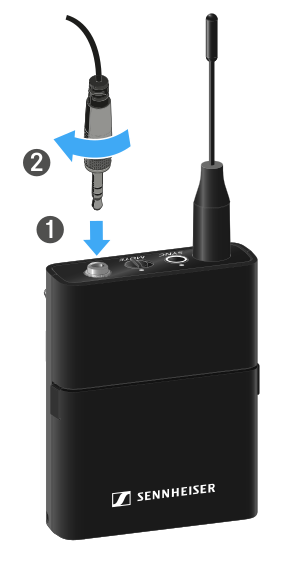
Compatible microphones
The following microphones are compatible with the bodypack transmitter:
Lavalier microphones:
- ME 2 | Lavalier microphone with omni-directional pattern (models from 2021 and later with gold-plated plug*)
- ME 4 | Lavalier microphone with cardioid pattern (models from 2021 and later with gold-plated plug*)
- MKE Essential (EW) | Lavalier microphone with omni-directional pattern
- MKE 2 (EW) | Lavalier microphone with omni-directional pattern (models from 2018 and later with blue serial number label)
- MKE 1 (EW) | Lavalier microphone with omni-directional pattern
Headset microphones:
- ME 3 | Headset microphone with cardioid pattern (models from 2021 and later with gold-plated plug*)
- HSP Essential (EW) | Headset microphone with omni-directional pattern
- HSP 2 (EW) | Headset microphone with omni-directional pattern (models from March 2020 and later with code 1090 or higher)
- HS 2 (EW) | Headset microphone with omni-directional pattern (models from 2021 and later with gold-plated plug*)
- Headmic 1 (EW) | Headset microphone with omni-directional pattern
*Pre-2021 models with a nickel plug are not recommended. They can pick up noise if they are placed too close to the transmitter.