Jump to main content
Evolution Wireless Digital
3rd Party API AVX Control Cockpit DeviceHub Digital 6000 Evolution Wireless Digital Profile Wireless Spectera SpeechLine Digital Wireless TeamConnect Bar TeamConnect Ceiling Medium TeamConnect Ceiling M Plus TeamConnect Ceiling 2 ...alle anzeigen
  • Product information
  • Instruction manual
  • Knowledge base
  • Technical data
  • Regulatory information
  • Contact
  1. Home
  2. Instruction manual

    Commission and operate devices in the Evolution Wireless Digital series.

  3. Products of the EW-D series

    Starting up and operating devices of the EW-D series.

  4. EW-D SKM-S handheld transmitter
  5. Product overview
  • Instruction manual

    Commission and operate devices in the Evolution Wireless Digital series.

    • Products of the EW-D series

      Starting up and operating devices of the EW-D series.

      • EW-D EM rack receiver
      • EW-D SKM-S handheld transmitter
        • Product overview
        • Inserting and removing the batteries/rechargeable batteries
        • Replacing the microphone module
        • Using EW-D Color Coding Sets to label transmission paths
        • Switching the handheld transmitter on and off
        • Checking the battery status of the transmitter (Check function)
        • Identifying the paired receiver (Identify function)
        • Meaning of the LEDs
        • Establishing a connection to the receiver
        • Muting the handheld transmitter
      • EW-D SK bodypack transmitter
    • Products of the EW-DX series

      Starting up and operating devices of the EW-DX series.

    • Products of the EW-DP series

      Starting up and operating devices of the EW-DP series.

    • Establishing a radio link | Synchronizing the receiver and transmitter
    • L 70 USB charger
    • CHG 70N-C charger

      The CHG 70N-C is a network enabled charger featuring two individual charging bays.

    • CHG 2W-II charging base
    • EW-D ASA antenna splitter
    • AWM active directional antenna
    • Cleaning and maintenance

      Note the following information when cleaning and maintaining products of the Evolution Wireless Digital series.

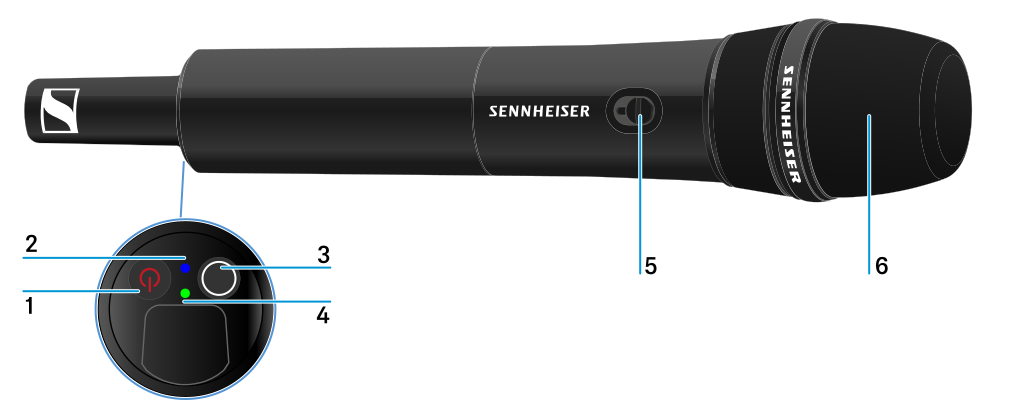
Product overview


1 ON/OFF button
  • See Switching the handheld transmitter on and off
2 DATA LED
  • See Meaning of the LEDs
3 SYNC button
  • See Establishing a radio link | Synchronizing the receiver and transmitter
4 LINK LED
  • See Meaning of the LEDs
5 Mute switch
  • See Muting the handheld transmitter
6 Microphone module
  • See Replacing the microphone module
v7.0 | 11/2026
English Deutsch Français Español Português 한국어 简体中
© Sennheiser electronic SE & Co. KG | |
Wählen Sie hier Ihre Sprache aus