
Selecting the phones output
Selecting the output for the PHONES socket of the mobile device.
The following outputs are available:
- Standard: Unbalanced mono or stereo phones output.
- Balanced: Enables right channel inversion for mono link modes.
The 'Balance' setting is disabled in this mode.
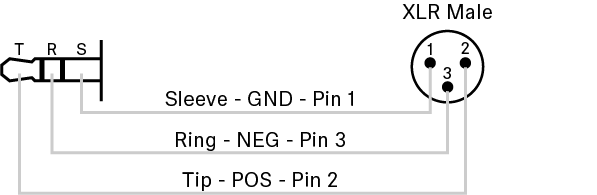
With this setting, for example, a cable with the following pinout can be used to connect the phones output to a balanced line input.
To choose the phone output:
- In the top bar, navigate to .
- Select the phone output from the drop-down list Phones Output.