Adjusting the mixer control
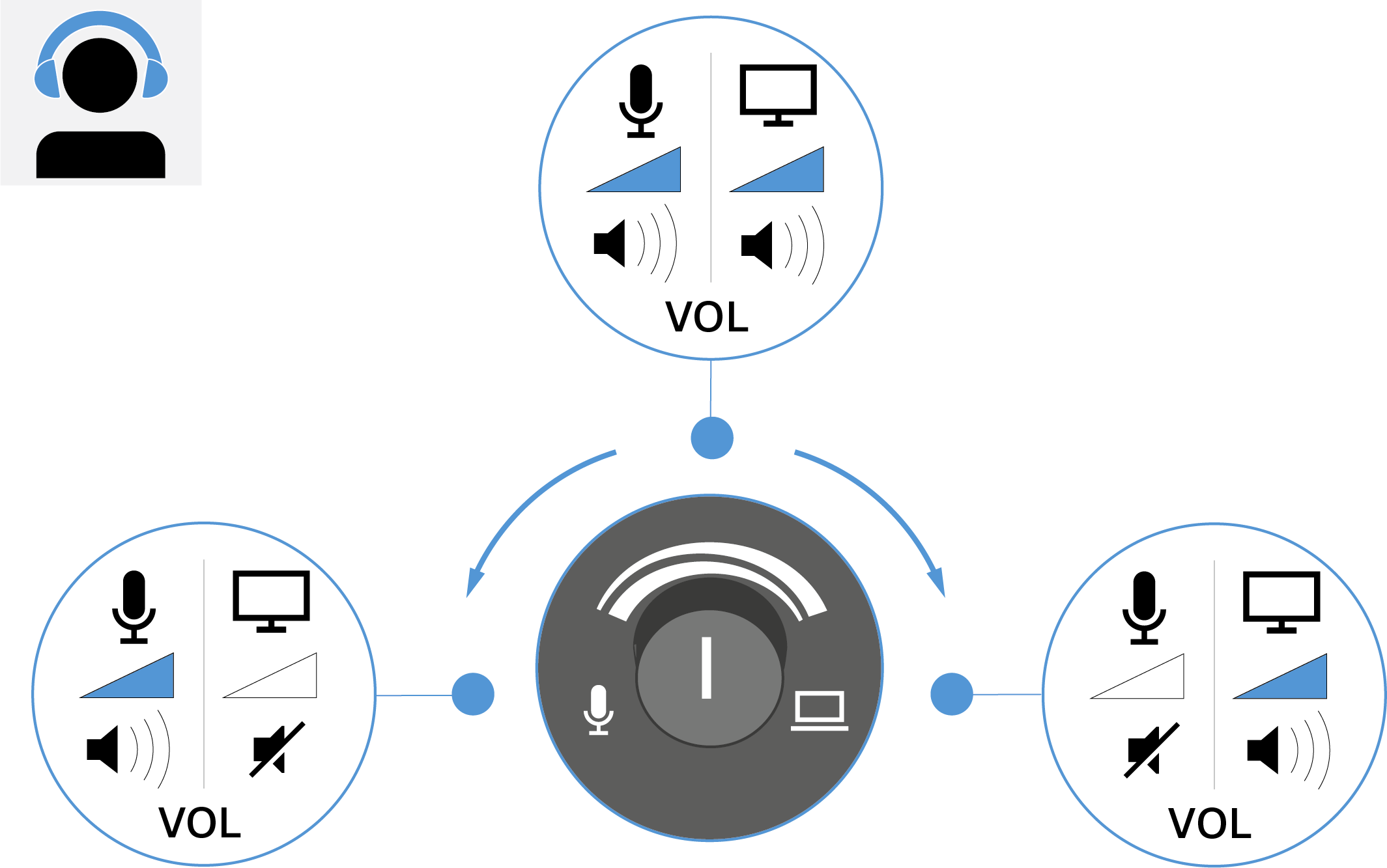
The mixer control allows you to set a custom mix of two audio sources.
The mixer control allows you to set a custom mix of two audio sources: the direct microphone input signal (e.g., your voice) and the audio output signal from your device (e.g. playback from a PC or mobile device) that arrives via the microphone’s USB-C port.
- Turn the knob to the left if the microphone signal is too quiet – the output signal of your device will become correspondingly quieter.
- Turn the knob to the right if the output signal of your device is too quiet – the microphone will be adjusted accordingly.
We recommend that you initially place the knob in the middle position to achieve a
balance between the microphone signal and the playback.
| WARNING | |
|---|---|
To adjust the balance:
- Rotate the knob toward the microphone icon (to the left) to focus the mixed signal on the microphone signal.
-
Rotate the knob toward the PC icon to focus the mixed signal on the output
signal from the device (for example, playback from the PC).