
Muting the table stand
The MUTE button can have different functions:
- Disabled: The MUTE button has no function.
- AF Mute: The audio signal is muted when the MUTE button is pressed. Pressing the button again activates the audio signal.
- PTT (Push to talk): Press and hold the MUTE button to activate the audio signal.
- PTM (Push to mute): Press and hold the MUTE button to mute the audio signal.
The function of the MUTE button can be configured in the Mute Mode menu item of the receiver (see Ch 1 / Ch 2 -> Mute Mode menu item).
To activate muting:
-
Briefly press the MUTE button while the table stand is switched on and a gooseneck microphone is connected.
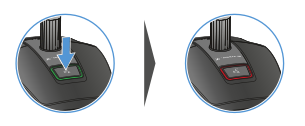
The button lights up red.
To cancel the muting:
-
Briefly press the MUTE button again.
The button lights up green. The audio signal is activated.